




Built In Garbage Collector Limitations in Progress OpenEdge
Even though Progress OpenEdge ABL has its own garbage collector, its functionality is limited compared to other garbage collectors. Its main objective is to check whether class instances are referenced anywhere and take appropriate action based on the result. This means the built-in garbage collector only takes care of class-based objects that are ultimately derived from the Progress.Lang.Object class. Other data types, like temp-tables, datasets, or buffers, are not managed automatically – they need to be manually deleted or emptied, otherwise they will reside in memory even if they're not referenced anywhere.
The garbage collector takes care of:
- User-defined object instances,
- System-generated error objects,
- .NET objects.
Note: handle-based objects are not automatically cleaned up by the garbage collector, and their management is left to the discretion of the developer.
How the Garbage Collector Works
An OOABL object is created, and the reference count to that instance is set to one. Any further reference to the same object instance increases the counter. If a reference to that object is discarded, the reference count drops by one accordingly.
If, at any point, the reference count to that object instance drops to zero, it's added to the destroy list, and the garbage collector will delete that instance at the next GC run time.
A GC run can be triggered:
- At idle time - period when ABL runtime is not executing and waiting for the next event or request.
- Before switching to another session context.
- At the end of a transaction block, if the reference was UNDO-scoped.
At GC run time, destructors will run of the instances its deleting.
Example.p
DEFINE VARIABLE o AS Progress.Lang.Object NO-UNDO.
DEFINE VARIABLE o2 AS Progress.Lang.Object NO-UNDO.

o = NEW Progress.Lang.Object(). // Create an object, ref count = 1
o2 = o. // Add another reference, ref count = 2
o2 = ?. // Drop one reference, ref count = 1
o = ?. // Drop last reference, ref count = 0 → object added to GC destroy list

/* At this point, GC will eventually destroy the object and call its destructor */
When GC Can Be Deferred or May Never Run
In certain cases, garbage collection can be deferred or may never run at all:
- In a transaction block, if the reference is UNDO-scoped. In this case, the GC will wait for the transaction to end, after which it will run and clean up unused memory.
Undo_scoped_variable_example.p
DEFINE VARIABLE o AS Progress.Lang.Object. // UNDO-scoped by default

DO TRANSACTION:
    o = NEW Progress.Lang.Object(). // Create object, reference count = 1
    o = ?. // Drop reference inside transaction, ref count = 0 but GC will wait for the transaction to end.
END.
/* Transaction ends → GC runs, object destroyed */ - If a circular reference occurs — in which case the reference count will never hit zero, and a memory leak may occur. Circular_reference_example.p
/* Create a class which holds an instance of itself */
CLASS Node:
    DEFINE VARIABLE next AS Node.
END CLASS.

/* Define two instances of that class */
DEFINE VARIABLE a AS Node NO-UNDO.
DEFINE VARIABLE b AS Node NO-UNDO.

/* Create two objects referencing each other */
a = NEW Node().
b = NEW Node().

a:next = b.
b:next = a.

/* Drop external references */
a = ?.
b = ?.

/* Circular references never let refence count drop to zero → GC never deletes them -> Memory leak occurs */ - If a Singleton instance is created. Since the instance references itself, the reference count never hits zero, and the GC never deletes the instance. Singleton_example.p
/* Create a class that references itself */
CLASS Singleton:
    DEFINE VARIABLE me AS Singleton.

    CONSTRUCTOR PUBLIC Singleton():
        me = THIS-OBJECT.
    END.
END CLASS.

/* Declare an variable of this classes type */
DEFINE VARIABLE s AS Singleton NO-UNDO.

/* Create an instance of this class  */
s = NEW Singleton().
/* External reference dropped, but self-reference never lets reference count drop to zero */
s = ?.

/* GC never deletes this object because it references itself */
The -nogc Option
The -nogc startup parameter disables the ABL garbage collector entirely, meaning objects are never automatically destroyed even when their references drop to zero. While this can help with debugging or performance testing by preventing unexpected destructor calls and GC pauses, it comes with a significant risk, because memory usage will continuously grow if unused objects accumulate without being freed, leading to potential memory leaks and degraded application stability over time.
How to add -nogc option to a execution program from PDSOE:
How to add the -nogc option to an execution program from PDSOE:
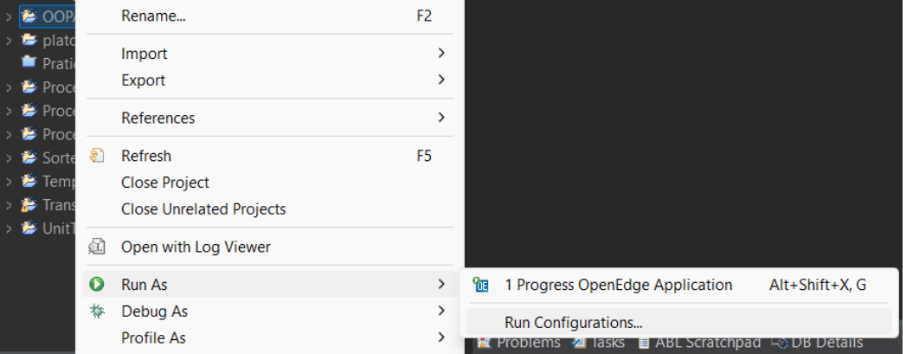
- Right-click on the project you want to add this option to → select ‘Run As’ → press ’run Configurations...’
- On the left, you'll see a list of all project files – select a specific file → go to the ‘Startup’ tab → in ‘Additional startup parameters,’ type in the -nogc option → press ‘Apply’
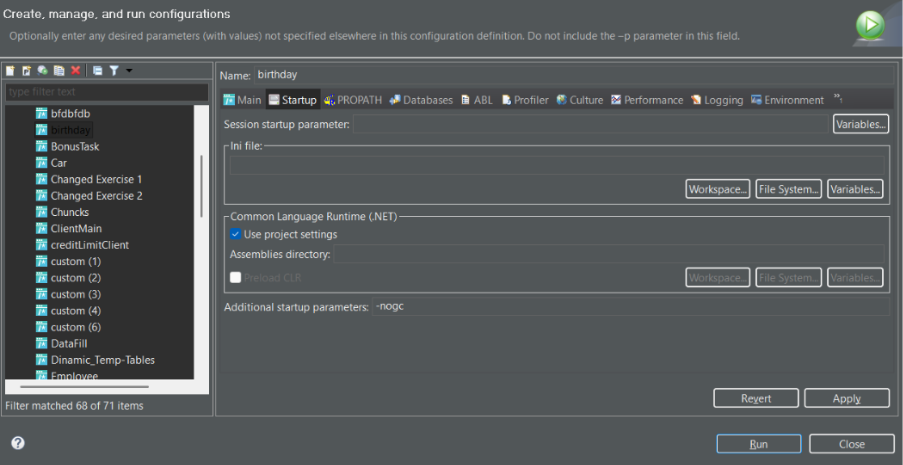
Note: you can apply -nogc to just specific files, not the whole project.
What Is a Memory Leak?
A memory leak is a situation where memory allocated for an object is never released, even though the program no longer needs it. When a memory leak occurs, the unused objects remain in memory, consuming resources unnecessarily. Over time, this can cause the application to use more and more memory, leading to slower performance, increased garbage collection pressure, and eventually, in severe cases, application crashes or out-of-memory errors occur. In ABL, memory leaks often result from circular references, self-referencing singletons, or long-lived references that are never cleared – Progress's own knowledge base covers several of these patterns in more detail.
Common memory leak cases
Persistent procedures
The PERSISTENT keyword in the RUN statement tells the AVM to start the procedure and leave it in memory until you delete it, or your session ends. For this reason, if it's not handled correctly and not deleted, it will reside in memory and, over time, can cause a memory leak. Ensure that every called procedure is deleted, so the memory is reclaimed, unless it's needed throughout the application's runtime life cycle. See the Progress documentation on running a persistent procedure for more detail.
Persistent_procedure_example.p
/* Define the handle and set the persistent procedure */
DEFINE VARIABLE hOrderProc AS HANDLE NO-UNDO.

RUN orderHandler.p PERSISTENT SET hOrderProc.

/* After use, if deletion is not called it will reside in memory until the end of the session */
IF VALID-HANDLE(hOrderProc) THEN
    DELETE PROCEDURE hOrderProc.
Temp-tables
If temp-tables are not emptied or deleted, they continue to consume memory for the life of the session. In long-running processes, this leads to steady memory growth, reduced performance, and can eventually cause instability or crashes.
Temp-Table.p
/* Define Temp-Table */
DEFINE TEMP-TABLE ttCustomer NO-UNDO
    FIELD CustNum AS INTEGER
    FIELD Name    AS CHARACTER.

/* If the procedure is called multiple times, the size grows and can cause performance and memory issues */
PROCEDURE getCustomers:

    EMPTY ttCustomer /* It is important to empty the temp-table before rewriting or after use */

    FOR EACH Customer:
        CREATE ttCustomer.
        ASSIGN
            ttCustomer.CustNum = Customer.CustNum
            ttCustomer.Name    = Customer.Name.
    END.
END.
Statically created temp-tables can be passed between AppServers. If the temp-table is passed via INPUT-OUTPUT, INPUT, or a HANDLE, no further action is needed apart from emptying it when the accumulated data is no longer needed, since its life cycle is managed by the session. If a dynamic temp-table is created, its life cycle is managed by the developer, and passing it to an AppServer requires manual deletion of the object inside the finally block in the application where it was created – regardless of whether it was passed as a reference or a copy.
Dynamic_Temp-Tables.p
DEFINE VARIABLE hTT AS HANDLE NO-UNDO.

DO ON ERROR UNDO, THROW:

    /* Create dynamic temp-table */
    CREATE TEMP-TABLE hTT.
    hTT:ADD-FIELDS-FROM("Customer").
    hTT:TEMP-TABLE-PREPARE("ttCustomer").

    /* Pass it to the AppServer by handle */
    RUN getCustomers ON SERVER INPUT TABLE-HANDLE hTT.

    /* Use the data locally */
END.

FINALLY:
    /* Correct cleanup of the dynamic temp-table */
    IF VALID-HANDLE(hTT) THEN
        DELETE OBJECT hTT.
Dynamic objects
Dynamic objects are objects that are created at runtime rather than defined at compile time. This includes objects such as:
- Persistent procedures (RUN ... PERSISTENT), as mentioned previously.
- Dynamic queries and buffers (CREATE QUERY, CREATE BUFFER).
- Dynamic temp-tables and datasets (CREATE TEMP-TABLE, CREATE DATASET).
- GUI widgets (CREATE FRAME, CREATE WINDOW).
- COM or .NET objects ( CREATE "Excel.application").
These objects occupy memory on the heap and are not automatically cleaned up by the runtime unless they're properly released. See the Progress documentation on deleting dynamic objects for more detail.
Dynamic_Object.p
/* Define a dynamic handles */
DEFINE VARIABLE hTT AS HANDLE NO-UNDO.
DEFINE VARIABLE hQuery AS HANDLE NO-UNDO.
DEFINE VARIABLE hFrame AS HANDLE NO-UNDO.

/* Create a dynamic temp-table */
CREATE TEMP-TABLE hTT.
hTT:ADD-FIELD("CustNum", "INTEGER").
hTT:ADD-FIELD("Name", "CHARACTER").

hTT:CREATE-BUFFER-HANDLE("CustomerBuffer").

/* Create a dynamic query on the temp-table */
CREATE QUERY hQuery.
hQuery:SET-BUFFERS(hTT:BUFFER-HANDLE("CustomerBuffer")).
hQuery:QUERY-PREPARE("FOR EACH Customer").
hQuery:QUERY-OPEN().

/* Create a GUI frame to display data */
CREATE FRAME hFrame
    TITLE "Customer Info"
    WITH FRAME fCustomer.

/* ...populate GUI with query data... */

/* ---------------- Cleanup ---------------- */
/* If not deleted dynamic objects are lost and will reside in memory, this can cause memory leaks */
IF hQuery:IS-OPEN THEN
    hQuery:QUERY-CLOSE().
IF VALID-HANDLE(hQuery) THEN
    DELETE OBJECT hQuery.

IF VALID-HANDLE(hFrame) THEN
    DELETE WIDGET hFrame.

IF VALID-HANDLE(hTT) THEN
    DELETE OBJECT hTT.
A few more dynamic objects can also cause memory leaks besides the ones mentioned above:
- MEMPTR - dynamic memory block, must SET-SIZE(<name>) = 0.
- X-DOCUMENT - dynamic XML document; must DELETE-OBJECT.
- X-NODEREF - dynamic XML node reference, must DELETE OBJECT if created separately.
- SOCKET - network connection, must CLOSE() and DELETE OBJECT.
- SOAP-HEADER-ENTRYREF and SOAP-HEADER - dynamic SOAP objects, must DELETE OBJECT.
- SERVER-SOCKET and SERVER - dynamic server objects, must CLOSE() and DELETE OBEJCT.
- SAX-WRITER, SAX-READER and SAX-ATTRIBUTES - dynamic XML streaming objects, must DELETE OBJECT.
- DATA-SOURCE - dynamic handle to a database query, must DELETE OBJECT.
- CLIENT-PRINCIPAL - dynamic handle to a cleant-user secutiry object, must DELETE OBJECT.
- BROWSE - dynamic GUI objects, must DELETE OBJECT.
Extra_Example.p
/* Example: X-DOCUMENT and SOCKET with proper cleanup */

DEFINE VARIABLE xd AS X-DOCUMENT HANDLE NO-UNDO.
DEFINE VARIABLE s  AS SOCKET     HANDLE NO-UNDO.

DO ON ERROR UNDO, THROW:

    /* Create dynamic X-DOCUMENT and populate it*/
    CREATE X-DOCUMENT xd.
    xd:LOAD("sample.xml").

    /* Create and connect SOCKET */
    CREATE SOCKET s.
    s:CONNECT("localhost", 1234).

    /* Work with the objects */

END.

FINALLY:

    /* Proper cleanup */
    /* X-DOCUMENT: delete object */
    IF VALID-HANDLE(xd) THEN
        DELETE OBJECT xd.

    /* SOCKET: close and delete object */
    IF VALID-HANDLE(s) THEN DO:
        s:CLOSE().
        DELETE OBJECT s.

END.
Event subscription
Subscribing to events creates a strong reference from the publisher to the subscriber. If not unsubscribed, the object stays in memory even after it’s no longer needed, causing memory growth, reduced performance, or crashes. Always unsubscribe before deleting the object.
Event_Subscription.p
/* Define the handle and persistent procedure */
DEFINE VARIABLE hPublisher AS HANDLE NO-UNDO.
RUN dataPublisher.p PERSISTENT SET hPublisher.

/* Subscribe to the DataChanged event */
SUBSCRIBE TO "DataChanged" IN hPublisher.

/* Later, cleanup or it can cause a memory leak */
IF VALID-HANDLE(hPublisher) THEN DO:
    UNSUBSCRIBE TO "DataChanged" IN hPublisher.
    DELETE PROCEDURE hPublisher.
END.
Note: in addition, previously mentioned cases (Circular reference and Singleton instance) can also cause memory leaks, due to the memory never being released.
How to Identify Memory Leaks
Memory leaks can be identified using AVM log files and the built-in LeakCheck class.
Firstly, we need to turn on logging for dynamic objects:
log-manager:logfile-name = logfile.
log-manager:log-entry-types = 'DynObjects.*:5'.
Create an instance of the LeakCheck class ( Include OpenEdge.Core.Util.LeakCheck is needed ):
checker = new LeakCheck().
Parse the log file again to read dynamic object entries:
checker = ParseLog(logFile).
If we want to check if there are leaks in general without any additional information we can call the HasLeaks() method:
message 'checker:HasLeaks()=' checker:HasLeaks()
skip view-as alert-box.
If there are leaks, the GetReport() method returns a JSON file with all the information about the leaks:
report = checker:GetReport().
report:WriteFile(session:temp-dir + 'leak_report.json', yes).
The created report file, shows information such as how many leaks appeared in the session, what file they appeared at, what line and what action triggered it, this allows for easier debugging and quicker fixing of code issues.
Note: for PDSOE 12.8.9 and higher, the Memory Profiler tool is available, which helps monitor and diagnose memory consumption across specified time intervals. Learn more in the OpenEdge Memory Profiler introduction.
Key Takeaways: Preventing Memory Leaks in Progress OpenEdge ABL
Memory management in Progress OpenEdge ABL requires careful attention to the manual cleanup of dynamic objects, persistent procedures, event subscriptions, and accumulated data, since the built-in garbage collector only handles class-based objects. Log-based leak detection and profiling tools significantly improve the ability to identify and fix memory leaks, helping ensure that long-running applications remain stable and efficient.
Get Expert Support for Your Progress OpenEdge Systems
If your organisation maintains or develops Progress OpenEdge systems and you want to ensure they stay stable and efficient over the long term, the Baltic Amadeus Progress OpenEdge team can help – from diagnosing memory issues to broader system modernisation strategy. Get in touch and let's talk about your project.