




What Is ABLUnit?
Before looking at the extension itself, it is worth understanding ABLUnit.
ABLUnit is a unit testing framework for Progress OpenEdge Advanced Business Language programs. It is similar to other xUnit-style testing frameworks, such as JUnit or NUnit, and helps bring more structure and automation to ABL testing.
According to Progress documentation, ABLUnit supports:
- Annotations for defining test cases
- A suite of assertion methods
- The ability to group and run tests in suites
- Command-line and launch-based test runners
- A visual results interface for reviewing test outcomes
In practice, ABLUnit gives developers the tools they need to write regression tests, support maintainable code and apply Test-Driven Development more effectively in OpenEdge ABL projects.
Why This Extension Matters
We used the ABLUnit Test Runner extension while working on a client ERP system. Our team was responsible for both the front-end and back-end parts of the system, and we needed a more efficient way to test the business logic layer.
The extension helped us run unit tests directly from Visual Studio Code, making it easier to include automated testing in the development process. It also supported our move towards Test-Driven Development: writing tests first, then implementing the code needed to make them pass.
How It Works
Since the extension integrates tightly with the native VS Code testing framework, it is worth familiarising yourself with VS Code’s Testing Documentation, especially if you’re new to its test interface or workflows.
The extension itself is quite simple. The diagram below illustrates the flow of inputs and outputs within the extension.

The extension functions by consuming input in the form of tested ABL files (either classes or procedures) along with optional configuration files. Here is a breakdown of its core components:
Inputs
- Test Files (
.cls,.p): ABL procedures or class files containing unit tests. - Configuration Files:
-
.vscode/settings.json: Defines test file inclusion and exclusion patterns. It’s especially helpful for debugging and automation of workflows. -
.vscode/ablunit-test-profile.json(optional): Provides advanced test launch configurations, mirroring the structure used by VS Code's own launch configurations. This is particularly useful in large projects with multiple test environments or databases. ablunit.json: A configuration file used by the ABLUnit framework that specifies which tests to run and the options to use. It is generated as part of the testing process and consumed by the framework. You can find more information about this file by reading the documentation written by Progress: run test cases from the command prompt
-
Execution and Output
To run ABLUnit tests in Visual Studio Code, simply use the built-in Test Explorer panel:
- Open the panel by clicking the beaker icon on the Activity Bar or selecting View > Testing.
- To run all tests, click the Run Tests button at the top of the panel:
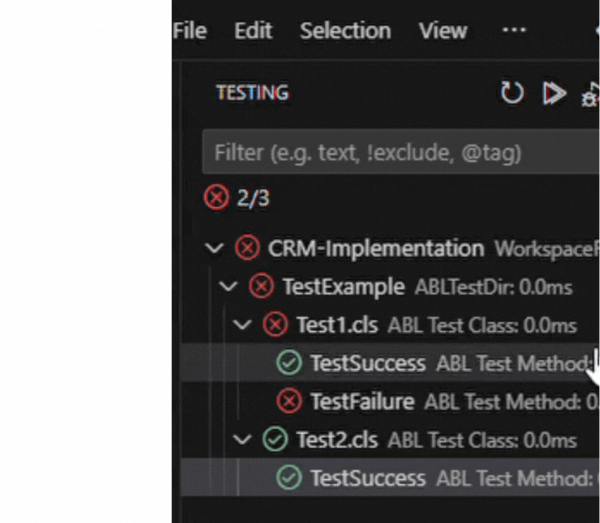
- To run tests in a specific folder, use the play icon next to that folder or test suite:
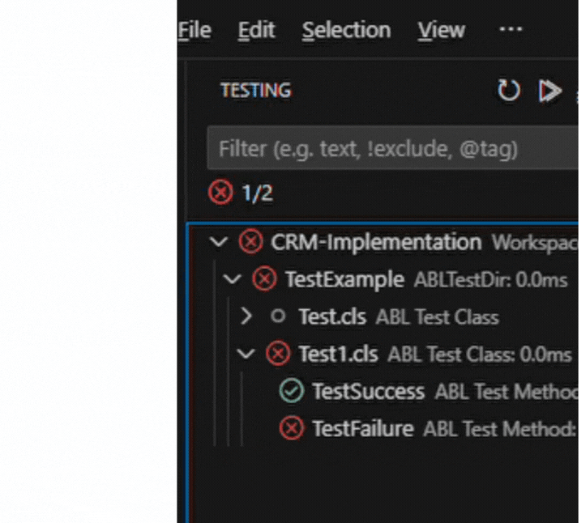
The results of executed ABLUnit tests are captured in the results.xml file – a machine-readable file used by the extension’s Testing panel to display test outcomes, such as coloured pass/fail indicators, skipped status (for example, the Test.cls suite represents a test that was not run), and coverage metrics that assist in refactoring and fixing code. Test results are organised by workspace folder, directory, class, and individual test methods. Additionally, the execution time for each test and group is displayed, making it easier to evaluate overall test performance.
Some Gotchas
Here are some notable challenges we encountered using this tool:
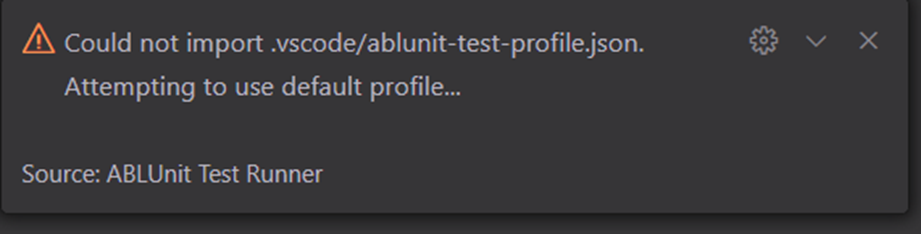
Initial warning
When running tests, a warning appears stating that configurations are optional. This is generally not an issue (most tested workspaces operate without any configuration) but for complex setups, defining a custom profile in .vscode/ablunit-test-profile.json can help resolve any anomalies.
Stale test executions
Sometimes, when the source code changes, the tests do not pick up the latest version. This can happen due to stale rcode (compiled output). Restarting the ABL language server through the VS Code command palette usually resolves this, ensuring the tests use the most current code. A future version of the extension may emit a warning when rcode is older than the source to help catch this earlier: Issue #306
results.xml Not Found
Errors like the following may occur:
Error parsing results ...\results.xml. err=EntryNotFound (FileSystemError): Error: ENOENT: no such file or directory, open '...\results.xml'
This typically happens when the project is opened as a folder instead of a workspace. The solution is to always open your project as a workspace. Having a workspace is the expected mode of operation for the extension.
Database connection issues
Another common error relates to the database used in tests not being found. While the extension attempts to provide diagnostic feedback, in these cases, manually verifying database access and configurations is often necessary.
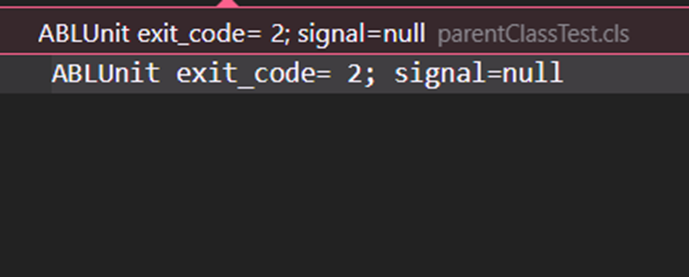
If your tests rely on a database and it is not properly connected or configured, you will likely see vague or misleading test errors, or an error such as the above.
In recent updates, more helpful diagnostics are being added to handle common issues like missing or misconfigured database connections. You can follow progress and improvements here: PR #307 – Improve feedback for DB connection issues
Results
Using the ABLUnit Test Runner extension improved our unit testing process and made test execution easier for the team. By adding the extension to our development environment, we were able to:
- Simplify test setup and execution.
- Spend less time managing test configurations.
- Improve visibility into test results and coverage.
- Identify gaps earlier in the development process.
- Speed up testing workflows.
- Reduce manual effort.
- Stay within Visual Studio Code without unnecessary context switching.
After seeing positive results in this ERP project, we continued using the ABLUnit Test Runner extension in other Progress ABL projects. Its integration with VS Code and support for ABLUnit testing have made it a useful tool in our development workflow.
In our experience, the ABLUnit Test Runner extension is an efficient way to run ABL unit tests when working in Visual Studio Code.
Developers who want to explore the tool further can find documentation, examples, snippets and source code in the extension’s GitHub repository.
Final thoughts
Unit testing helps teams build more reliable, maintainable software. For Progress OpenEdge ABL projects, ABLUnit provides the testing framework, while the ABLUnit Test Runner extension makes the process easier to manage in Visual Studio Code.
If your team works with Progress OpenEdge and wants to improve testing practices, Baltic Amadeus can help assess your current development workflow and suggest practical ways to strengthen quality, automation and maintainability. Reach out to our team.