




A Typical Scenario: Qlik to Power BI during a Dynamics AX to Dynamics 365 Rollout
Picture an organisation with, say, 10–20 subsidiaries, migrating from a legacy ERP (such as Dynamics AX) to a modern one (such as Dynamics 365) over two years. The rollout isn't a single cutover: larger entities run their own ERP instance, smaller ones share a common one, and each moves to the new system on its own timeline.
Underneath sits a BI environment that's grown over years, built in a tool like Qlik Sense, with hundreds of report pages and thousands of embedded calculated measures, much of the underlying logic undocumented. Users expect the new reports to look and behave like the old ones. A BI team of a handful of people has to deliver this alongside their regular workload, against a fixed deadline set by the migration project.
This combination of scale, undocumented logic, thin internal capacity, and a fixed deadline is what makes this kind of migration genuinely hard rather than routine.
Why 'Re-platform Everything at Once' Usually Fails
From a distance, say, from a leadership view, this can look like a simple lift-and-shift: move the reports, point them at the new ERP, done. Anyone who has worked with the underlying data models knows it isn't. Two things make that plan fail in practice:
Old and new ERP systems store data differently. This is the biggest gap. A legacy ERP and its successor rarely organise the same business data the same way, so you have to map the old data source to the new one (or vice versa). That mapping effort is a big part of why ERP implementation projects take so long. On top of that, the data source keeps moving: with entities cutting over on different dates, the BI platform has to abstract away which ERP a given entity is currently running, for the full duration of the rollout, not just a brief overlap window.
Users expect the as-is experience, but not the as-is platform. Qlik's associative engine and Power BI's explicit relationship model don't work the same way. Recreating the look of a report is a fraction of the work; recreating its behaviour under every filter combination is the real work.
Organisations that get this wrong tend to either freeze the BI roadmap until the ERP programme finishes (leaving users on an ageing platform for years) or attempt a clean-slate rebuild that quietly breaks report behaviour no one documented in the first place.
The 7 Steps at a Glance
The seven steps below fall into three phases: Plan (Steps 1–2), Architect (Steps 3–4), and Discover & Validate (Steps 5–7). The diagram provides an overview. Each step is explained in detail below.
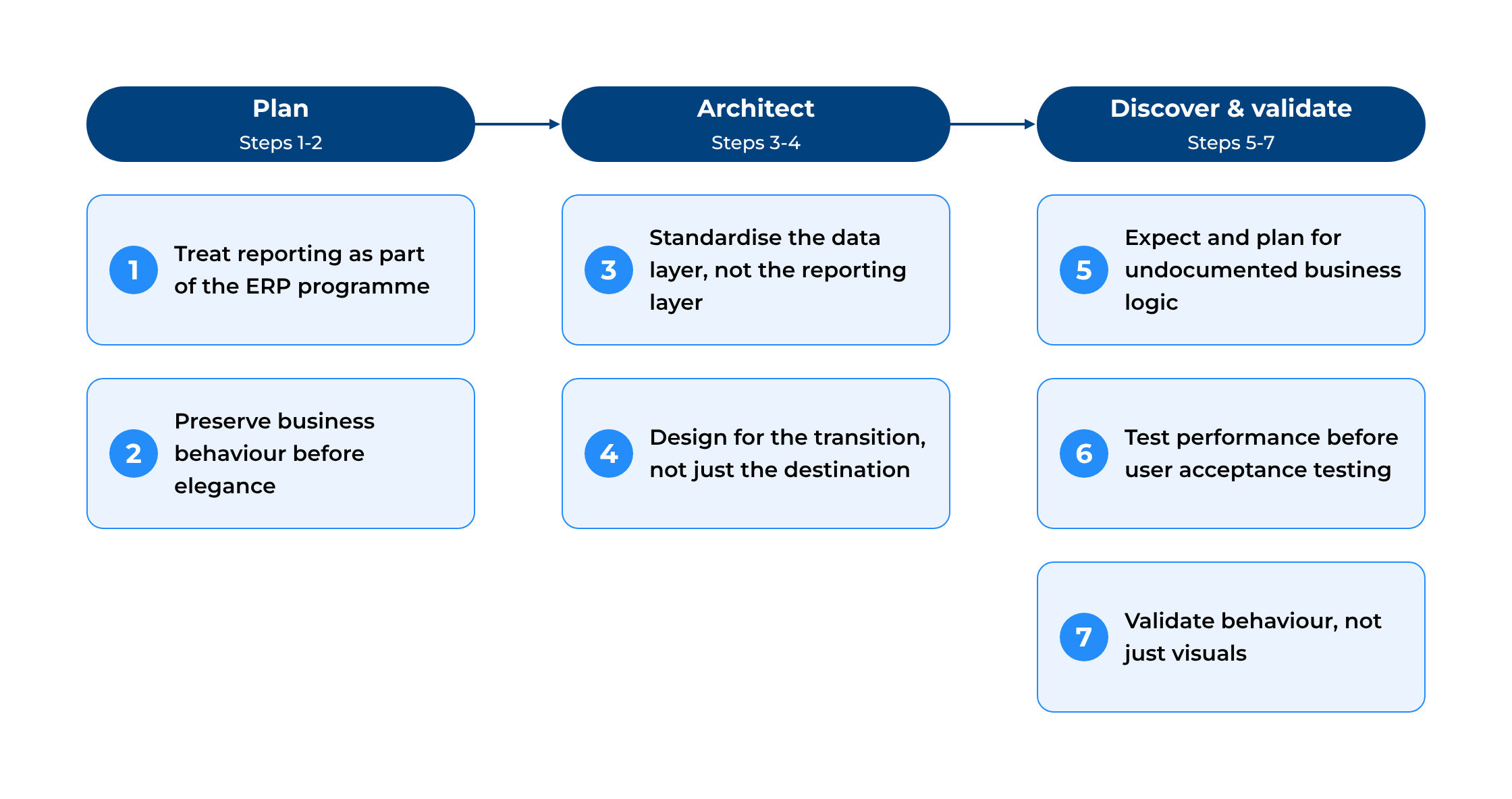
Figure 1. Seven steps to modernise BI during an ERP transition, grouped into Plan, Architect, and Discover & Validate phases.
Step 1: Treat reporting as part of the ERP programme, not a follow-on project
ERP migrations are typically planned around replacing operational systems, with reporting addressed afterwards. In practice, business users judge the success of an ERP rollout by whether they can still trust the numbers they rely on every day. Planning the BI migration alongside the ERP programme from day one, not after go-live, reduces delivery risk and prevents reporting from blocking individual entities' cutovers.
Step 2: Preserve business behaviour before pursuing architectural elegance
A clean-sheet redesign of semantic models is attractive from a technical standpoint. However, it introduces unnecessary functional risk when hundreds of business-critical reports already exist. At this scale, the more pragmatic approach is to migrate each legacy application into its own separate semantic model rather than consolidating everything into a smaller shared set. Where applications carry genuinely different business logic, calculations, and data structures, forced consolidation adds complexity and puts functional parity at risk for no real benefit. This approach fits large report estates. For smaller organisations with fewer reports and more overlapping logic, consolidating into shared semantic models can be the better option, so the right choice depends on scale.
Step 3: Standardise the data layer, not necessarily the reporting layer
The redesign work should happen below the semantic model layer, not within it. A layered (medallion) architecture, Bronze for raw ingestion, Silver for cleaned and standardised structures, Gold for business-ready presentation models, lets data from different source systems be normalised into a common structure before it ever reaches individual reports. This works regardless of which ERP a given entity happens to be running at the time. On Microsoft Fabric, for example, these layers are typically built as Lakehouses (Fabric's combined file and table storage) that feed Power BI semantic models.
The generalisable lesson: preserving an as-is reporting experience does not require keeping the legacy platform architecture. Modernise the ingestion and transformation layer completely, while leaving the reporting logic users depend on untouched, as long as the architectural boundary between the two is placed deliberately.
Step 4: Design the architecture for the transition, not only the destination
Because entities migrate over an extended period, the BI platform needs to support both the old and new ERP simultaneously, not simply replace one with the other on a single cutover date. Designing explicitly for this transitional, dual-system state, rather than assuming a clean handover, lets the ERP programme progress at each entity's pace without repeatedly redesigning the reporting platform every time another entity cuts over.
Step 5: Expect, and plan for, undocumented business logic
Long-lived BI environments inevitably accumulate business rules that exist only inside reports, calculations, and data transformations, not in any specification document. Treat discovering and documenting this logic as a core, budgeted migration activity from the outset, not an unplanned complication discovered mid-project, particularly where internal teams have limited capacity or institutional memory has faded over time.
Step 6: Start performance testing before user acceptance testing
Modelling patterns that perform well in one BI platform can behave very differently in another. A relationship pattern that returns correct results instantly in an associative engine like Qlik, for example, can degrade severely in a platform with an explicit relationship model once users start combining multiple dimensions and filters. Testing complex relationship patterns, calculation logic, and large-volume queries early, before reports reach end users, surfaces these risks.
Step 7: Validate behaviour, not just visuals
A migrated report can look identical while producing different results under specific filter combinations or calculation contexts. Functional validation needs to go beyond comparing charts and tables, checking calculations, filter interactions, drill paths, security rules, and edge cases against the legacy solution's actual output. In practice, this usually means reverse-engineering and reproducing:
- Set-analysis-style expressions and calculated measures, rebuilt in the new platform's calculation language.
- Associative or implicit filtering behaviour, recreated through an explicitly defined data model.
- Default selections, filter dependencies, and exclusion logic.
- Drill-down and navigation behaviour.
- Report-level and user-level security.
- Conditional formatting and business-specific visual states.
- Export flows and spreadsheet-oriented user workflows.
- Scheduled and distributed reporting previously handled by the legacy tool.
- Calculation behaviour for totals, subtotals, currencies, and time periods.
Structuring Delivery for Parallel Workstreams
When 10–20 entities are migrating on staggered timelines, internal and delivery teams need to build separate platform components (separate Lakehouses, separate semantic models, overlapping testing cycles) without getting in each other's way, often while internal capacity stays limited throughout. DevOps practices, coordinated version control, structured change management, testing, and controlled deployment within environments make it possible to run architecture, migration, and validation work concurrently instead of sequentially. That matters most when a hard licence-renewal deadline leaves no room for a fully linear 'finish one entity, start the next' approach.
Where AI tools Can Help?
AI tools work best as an engineering accelerator throughout, not as an autonomous part of the migration. In practice, that typically looks like: a Copilot-style assistant embedded in the data platform for engineering tasks, a general coding assistant for code generation, troubleshooting, and documentation, and tools that support writing and reviewing calculation logic specifically, often one of the heaviest and most error-prone parts of reproducing legacy business logic.
Every AI-generated output still needs review and validation by the legacy solution's actual behaviour before release. AI accelerates the work. It doesn't replace the validation discipline the project depends on.
What to Expect?
These are illustrative expectations for a well-run project of this kind, not figures from a specific measured engagement:
- All entities in scope end up covered by a single target architecture, rather than a patchwork of platform versions.
- Priority reports are typically achievable ahead of such legacy licence renewal deadlines, avoiding an extended period of paying for two BI platforms in parallel, provided documentation and testing start early enough.
- High functional parity against the legacy solution is realistic when validation covers behaviour, not just visuals. However, the exact percentage depends heavily on how much undocumented logic existed and how early testing began.
- The ERP rollout itself is less likely to be blocked or delayed by BI readiness, since the reporting platform is built for the transition state rather than only the end state.
Why This Matters?
Organisations undertaking ERP transitions tend to treat BI as downstream, something to modernise once the 'real' project is finished. That framing is risky – reporting continuity during the transition often determines whether the business trusts the numbers it uses to make decisions. The transferable principle isn't 'migrate to a specific platform' – it's that as-is reporting continuity and platform modernisation aren't in tension, provided the architectural boundary between them is placed deliberately at the data layer, not the reporting layer users interact with every day.
Planning a BI modernisation alongside your own ERP transition? Contact Baltic Amadeus data analytics experts for a consultation.
Frequently Asked Questions
How long does a BI migration typically take during a multi-year ERP transition?
It depends heavily on the number of entities, the size of the legacy report catalogue, and how much business logic is undocumented. Migrations of this scale commonly run in parallel with the ERP rollout itself, often 12-24 months, rather than as a short, separate project.
Should all legacy reports be consolidated into one shared Power BI semantic model?
Not necessarily. Where applications carry genuinely different business logic, calculations, or security requirements, keeping them as separate semantic models, while standardising the data layer underneath, is often safer and reduces migration risk.
Can Power BI completely reproduce Qlik's associative filtering behaviour?
Not automatically. Qlik's associative engine exposes relationships across data implicitly; Power BI requires you to design relationships, filter directions, and calculation contexts explicitly. Reproducing equivalent behaviour is achievable, but it requires deliberate data modelling, not a like-for-like feature mapping.
How do you handle undocumented business logic in a legacy BI environment?
Treat discovery as a planned, budgeted activity: reverse-engineer existing reports and calculations, compare outputs in comparison to the running legacy system, and validate with business users, rather than assuming you can infer it from the reports' visual design alone.
When should performance testing start in a BI modernisation project?
Before user acceptance testing, ideally as soon as core data models and key report patterns exist. Some patterns that perform acceptably in a legacy platform degrade significantly under a new platform's relationship model, and these are far cheaper to catch early than after go-live.
Does modernising the data platform require rebuilding every report from scratch?
No. The most resilient approach separates the two concerns: modernise the ingestion and transformation layer (the data platform) while preserving the reporting logic and behaviour users already rely on, rather than treating platform modernisation and report redesign as the same project.