



How the MCP Server Works
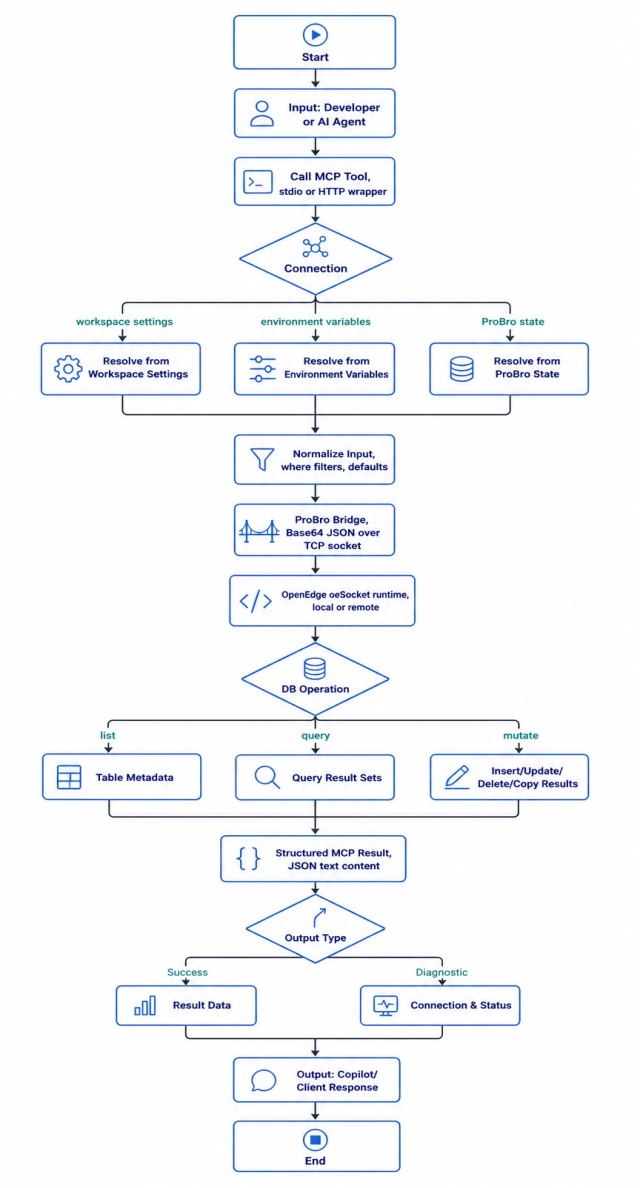
Inputs
The server accepts three broad categories of input:
- A user request from Copilot Chat, an MCP client, or an HTTP client;
- Connection details: database name, runtime mode, host/port, and optional credentials;
- Operation-specific data: table name, filter, sort/paging options, or mutation payload.
Use case steps
- The client calls a ProBro MCP tool;
- The server reuses the active connection or resolves automatic configuration;
- Input is validated with Zod and normalised for the existing ProBro protocol;
- ProBroBridge sends base64-encoded JSON through the OpenEdge socket runtime;
- The response is parsed and returned as structured JSON text content.
Outputs
Depending on the tool called, the server returns:
- Available tables and table metadata;
- Query result sets;
- The result of a requested insert, update, delete, or copy action;
- Connection, version, and saved-connection diagnostics.
Architecture and Implementation
The server exposes ProBro capabilities as MCP tools, then optionally re-exposes those same tools through a REST wrapper for easier interoperability.
MCP tool surface
The server is a standalone Node.js application based on modelcontextprotocol/sdk. It publishes a small, explicit tool surface instead of exposing the raw socket protocol directly.
Current tools cover connection setup, diagnostics, schema discovery, querying, and mutations:
- probro_set_connection;
- probro_get_connection_status;
- probro_refresh_auto_connection;
- probro_get_saved_connections;
- probro_get_version;
- probro_list_tables;
- probro_get_table_details;
- probro_query_table;
- probro_mutate_table.
Code snippet – ProBro-MCP/src/index.js.
const server = new McpServer({
    name: 'probro-mcp-server',
    version: '0.1.0',
});

server.tool(
    'probro_get_table_details',
    withBehavioralDefaults('Get detailed schema and field information for a specific table.'),
    { tableName: z.string() },
    async ({ tableName }) => asTextContent(await exec('get_table_details', tableName))
);
Auto-connect and fallback strategy
An explicit call to probro_set_connection supports both local and remote runtime modes – local mode starts the OpenEdge socket runtime, while remote mode connects to an existing agent.
For unattended startup, the current implementation resolves automatic configuration in this order:
- .vscode/settings.json ProBro keys;
- PROBRO_* environment variables, when PROBRO_AUTO_CONNECT is enabled.
Saved ProBro connection definitions in VS Code state (pro-bro.dbconfig) are available for inspection through probro_get_saved_connections, though they are not currently used as an auto-connect source.
Code snippet – ProBro-MCP/src/index.js.
function getAutoConnectionInput() {
    const proBroStateInput = getAutoConnectionInputFromProBroState();
    if (proBroStateInput) {
        return { source: 'proBroState', input: proBroStateInput };
    }

    const settingsInput = getAutoConnectionInputFromWorkspaceSettings();
    if (settingsInput) {
        return { source: 'workspaceSettings', input: settingsInput };
    }

    const envInput = getAutoConnectionInputFromEnv();
    if (envInput) {
        return { source: 'env', input: envInput };
    }

    return null;
}
Input normalisation and behavioural defaults
The server accepts friendly query payloads and adapts them for ProBro using Zod for validation. For example, it strips an optional leading where from filter phrases and converts supported filter shapes into the backend's expected representation.
Code snippet – ProBro-MCP/src/index.js.
function normalizeWherePhrase(wherePhrase) {
    if (!wherePhrase) {
        return wherePhrase;
    }
    const trimmed = String(wherePhrase).trim();
    return trimmed.replace(/^where\s+/i, '');
}

function normalizeFilters(filters) {
    if (Array.isArray(filters)) {
        const columns = {};
        for (const item of filters) {
            const key = item.column || item.columnKey || item.name;
            const value = item.value;
            if (key && value !== undefined && value !== null) {
                columns[key] = String(value);
            }
        }
        return { enabled: true, columns };
    }
    return filters;
}
ProBro bridge execution model
ProBroBridge retains the existing OpenEdge integration contract: JSON is base64-encoded, sent as a newline-terminated TCP message, then parsed as JSON on response.
Code snippet – ProBro-MCP/src/probroBridge.js.
export class ProBroBridge {
        async execute(requestPayload) {
        const encoded = Buffer.from(JSON.stringify(requestPayload), 'utf8').toString('base64');
        return this.sendEncoded(encoded);
    }

    async sendEncoded(encoded) {
        this.socket.write(`${encoded}\n`);
        // wait for newline-terminated response and parse JSON
    }
}
HTTP wrapper for broader consumption
The HTTP wrapper calls the MCP server as an MCP client and exposes each tool at POST /api/<tool-name>. This supports integrations that cannot invoke stdio MCP directly.
Code snippet – ProBro-MCP/src/http-wrapper.js.
const server = http.createServer(async (req, res) => {
     const toolName = req.url.split('/').filter(Boolean)[1];
     const args = body ? JSON.parse(body) : {};

     const result = await callMcpTool(toolName, args);
     const text = extractText(result);
     const payload = parsePayload(text);

     res.end(JSON.stringify({ ok: true, tool: toolName, result: payload }));
});
How to Use This MCP Server
Prerequisites
- Node.js 18 or later;
- npm install executed in the ProBro-MCP repository;
- An OpenEdge runtime for local mode, or a reachable ProBro/OpenEdge agent for remote mode.
Register it in VS Code
Add an MCP server definition to your VS Code MCP configuration, updating the path to your local ProBro-MCP checkout:
{
    "servers": {
        "probro": {
            "command": "node",
            "args": ["c:/Users/sjakubenas/projects/ProBro-MCP/src/index.js"]
        }
    }
}
Restart the MCP server from VS Code after changing its configuration. In Copilot Chat, you can then call a tool directly or ask an operation-oriented question – for example, "List the available ProBro tables." For more advanced usage patterns, see the Copilot Chat integration guide.
Establish a connection
Use local mode when the MCP server should start the local OpenEdge runtime, or remote mode when the OpenEdge agent is already running. Send either payload to probro_set_connection, then verify it with probro_get_connection_status or probro_get_version.
local mode
{
    "mode": "local",
    "dlc": "C:\\Progress\\OpenEdge",
    "database": "C:\\data\\sports2020.db",
    "agentPort": 23456
}
remote mode
{
    "mode": "remote",
    "agentHost": "127.0.0.1",
    "agentPort": 23456,
    "database": "sports2020"
}
Discover and query data
- Call probro_list_tables to identify an available table;
- Call probro_get_table_details with { "tableName": "Customer" } before constructing a query or mutation;
- Call probro_query_table with a constrained request:
{
    "tableName": "Customer",
    "wherePhrase": "Customer.CustNum = 3000",
    "pageLength": 10,
    "sortColumns": [
        { "columnKey": "CustNum", "direction": "ASC" }
    ]
}
For an update, query the record first and retain its ROWID as lastRowID. The MCP server instructs clients to use this pattern to make writes deterministic:
{
    "tableName": "Customer",
    "mode": "UPDATE",
    "crud": [],
    "data": [
        { "key": "Country", "value": "USA", "defaultValue": "Mexico" }
    ],
    "useWriteTriggers": true,
    "useDeleteTriggers": true,
    "wherePhrase": "Customer.CustNum = 3000",
    "lastRowID": "0x0000000000002401"
}
Use the HTTP wrapper
Start the wrapper from ProBro-MCP:
```powershell
npm run start:http
```
Then call the same MCP tools through HTTP, for example:
```powershell
Invoke-RestMethod -Method Post `
-Uri 'http://localhost:3000/api/probro_list_tables' `
-ContentType 'application/json' `
-Body '{}'
```
The wrapper returns a consistent envelope:
{
    "ok": true,
    "tool": "probro_list_tables",
    "result": []
}
Validate the installation
Run the smoke test to confirm that the MCP process starts and its expected tools register:
```powershell
npm run test:smoke
```
Run the integration test only after setting connection environment variables and ensuring the target agent/database is available:
```powershell
$env:PROBRO_MCP_MODE = 'remote'
$env:PROBRO_AGENT_HOST = '127.0.0.1'
$env:PROBRO_DB_DATABASE = 'sports2020'
npm run test:integration
```
Challenges and Solutions
Building the ProBro MCP server surfaced four practical challenges, each shaping a specific part of the current implementation.
Tool schema validation mismatches
Issue: MCP tool validation failed under strict schema requirements, notably arrays that required explicit items definitions.
What was done: Zod schemas for array-based fields (sortColumns, crud, data) were hardened, with defaults kept explicit.
Code snippet – ProBro-MCP/src/index.js.
const sortColumnSchema = z.object({
    columnKey: z.string(),
    direction: z.enum(['ASC', 'DESC']).default('ASC'),
});

sortColumns: z.array(sortColumnSchema).default([]),
crud: z.array(z.string()).default([]),
data: z.array(z.object({
    key: z.string(),
    value: z.union([z.string(), z.number(), z.boolean(), z.null()]),
    defaultValue: z.union([z.string(), z.number(), z.boolean(), z.null()]).optional(),
})).default([])
Connection bootstrap reliability
Issue: Runtime startup and connection behaviour varied across local and remote modes, and stale registration or configuration could cause confusing failures.
What was done: Deterministic connection resolution, status reporting, and a refresh endpoint/tool were added, along with clearer error messages that indicate the configuration source and fallback behaviour.
Code snippet – ProBro-MCP/src/index.js.
server.tool(
    'probro_refresh_auto_connection',
    'Force-refresh auto-connect settings and reconnect using env or workspace ProBro configuration.',
    {},
    async () => {
        const status = await refreshAutoConnection();
        return asTextContent({ ok: true, refreshed: true, status });
    }
);
Payload compatibility with backend expectations
Issue: Inputs from different clients weren't always shaped exactly as the ProBro backend expected.
What was done: Normalisation was added for wherePhrase and flexible filters formats, alongside behavioural defaults guidance embedded directly in tool descriptions to steer agent behaviour.
Interoperability with chat/tooling ecosystem
Issue: Some consumers are easier to integrate over HTTP than over MCP stdio.
What was done: An HTTP wrapper was added with a consistent response envelope and an endpoint-per-tool model, so non-MCP clients can reach the same functionality.
Results of the ProBro MCP Implementation
Exposing ProBro through MCP turns a proprietary socket protocol into a standard, predictable tool surface that AI agents and developer tools can rely on – whether they connect over stdio or HTTP. By handling connection resolution, input normalisation, and payload validation consistently in one place, the server removes the need for every integration to solve the same problems independently.
The result is a foundation that's already usable for day-to-day querying and mutation work, with room to grow: extending the tool surface and hardening auto-connect as more consumers come on board.
Delivered capabilities
ProBro functionality exposed via MCP tools:
- probro_set_connection;
- probro_get_connection_status;
- probro_get_version;
- probro_get_saved_connections;
- probro_refresh_auto_connection;
- probro_list_tables;
- probro_get_table_details;
- probro_query_table;
- probro_mutate_table.
An optional HTTP access layer for non-MCP clients (npm run start:http). Smoke and integration testing scripts for repeatable validation.
Validation evidence
The smoke test verifies server startup and tool registration.
Code snippet – ProBro-MCP/scripts/smoke-test.cjs.
const expectedTools = [
    'probro_set_connection',
    'probro_get_version',
    'probro_get_saved_connections',
    'probro_list_tables',
    'probro_get_table_details',
    'probro_query_table',
    'probro_mutate_table',
];

for (const expected of expectedTools) {
    assert(toolNames.includes(expected));
}
Impact summary
- The ProBro database is now accessible through a formal MCP contract;
- AI-assisted workflows can perform read/write operations with consistent semantics;
- The HTTP wrapper broadens adoption where MCP client support is unavailable;
- Connection/auto-connect logic is now robust enough for day-to-day usage and demos.
Exposing ProBro through MCP is one piece of a broader move towards making OpenEdge systems easier to integrate with modern, AI-assisted tooling. As agent-based workflows become more common, having a consistent, well-tested interface between an OpenEdge database and the tools that consume it will only become more valuable.
If your organisation is exploring how to modernise or extend its Progress OpenEdge systems, visit the Progress OpenEdge product page to learn more about the platform and its wider ecosystem.