



What is an Incremental .df File?
An incremental .df file is a snapshot of schema differences between two databases. Instead of exporting the entire schema, it captures only the changes, which makes it ideal for keeping different environments (like development and production) in sync without requiring a full rebuild.
For teams maintaining large or critical systems, this greatly reduces the risk and effort of rolling out updates. This method is especially useful in environments where downtime is costly or unacceptable.
Explore our Progress OpenEdge services
What Changed in OpenEdge 12.4?
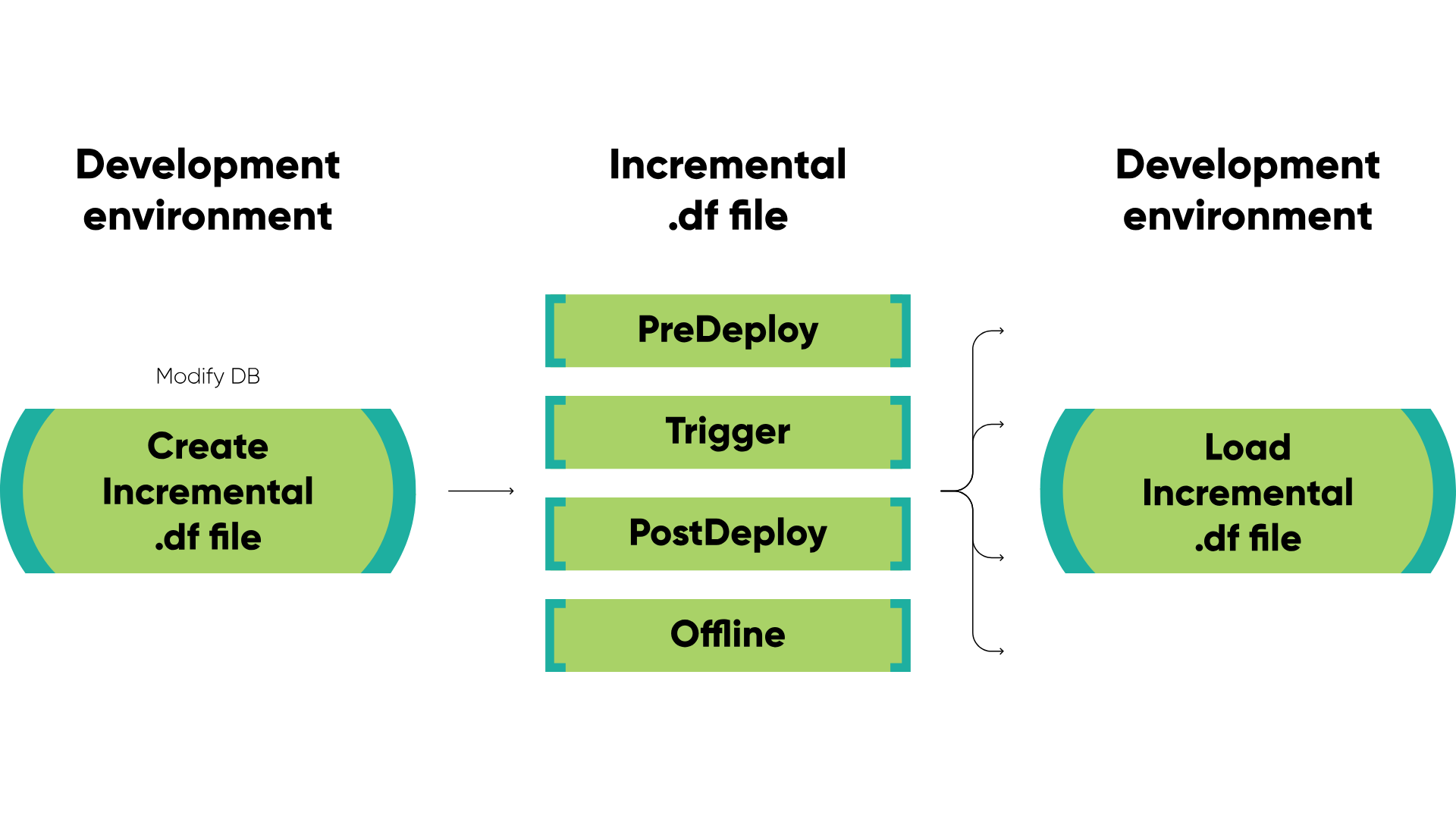
Starting with Progress OpenEdge version 12.4, the format of the incremental .df file was enhanced to support online schema changes by dividing the file into structured sections:
- PreDeploy – non-disruptive online operations.
- Trigger – all trigger definition changes.
- PostDeploy – disruptive online operations like field drops.
- Offline – changes that must occur while the database is offline.
This phased approach gives developers more flexibility and control during live deployments – especially when used in CI/CD pipelines.
How it works?
Dumping/Loading Incremental .df through GUI
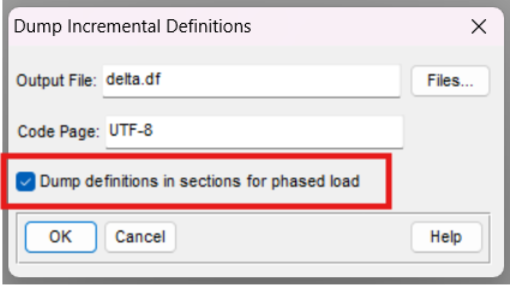
You can generate .df files in either the old or new format through the Data Administration Tool. To enable the sectioned format:
- Navigate to Dump Incremental Definitions
- Tick “Dump definitions in sections for phased load”
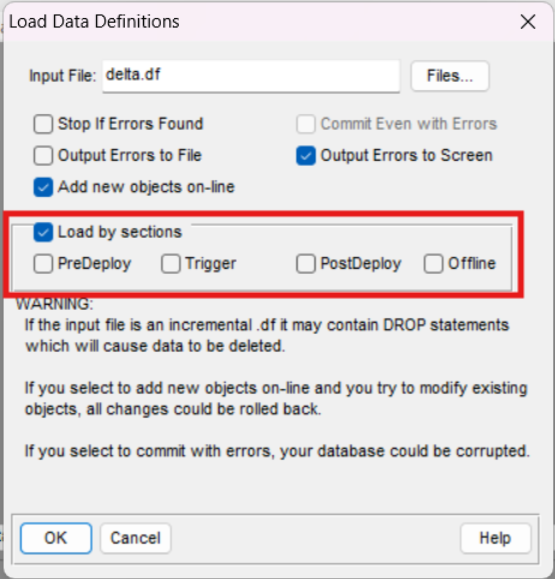
When loading a delta.df file, you can choose whether to load it by sections and even select which sections to apply. To make online schema changes, be sure to check “Add new objects online” in the Load Data Definitions window.
Loading via Console: load_df_silent.p
You can also load incremental .df files silently using the console and the procedure load_df_silent.p, part of Progress OpenEdge source code.
Note: If src/prodict.pl is missing from your installation, you can download it from the Progress GitHub ADE repo.
Input Parameters
- pcFileName: Path to the .df file
- pcOptions: Comma-separated flags, including:
- AddObjectsOnline – load new tables and sequences on-line
- ForceCommit – commit even with errors
- ForceIndexDeactivate – create new indexes inactive
- ForceSharedSchema – ignore Multi-tenant properties
- PreDeployLoad – load PreDeploy section
- TriggerLoad – load trigger section
- PostDeployLoad – load PostDeploy section
- OfflineLoad – load predeploy section
Output Parameters
- pcWarnings – displayable warnings
Examples:
Loading everything online
DEFINE VARIABLE pcWarnings AS CHARACTER NO-UNDO.

run C:\Progress\OpenEdge\prodict\load_df_silent.p ("delta.df","AddObjectsOnline", OUTPUT pcWarnings).
Loading chosen online changes
DEFINE VARIABLE pcWarnings AS CHARACTER NO-UNDO.

run C:\Progress\OpenEdge\prodict\load_df_silent.p (
    "delta.df",
    "AddObjectsOnline,PreDeployLoad,PostDeployLoad",
    OUTPUT pcWarnings).
Console Behavior Observed:
- Passing AddObjectsOnline with specific sections.
- Passing AddObjectsOnline without specifying sections causes an error if offline changes exist.
Need help automating schema updates or CI/CD integration? Talk to our Progress OpenEdge experts.
Types of schema changes supported
These schema change operations cannot be carried out online and therefore require an exclusive schema lock on the database.
Important caveats: dropping fields online
Yes – fields can be dropped online, with some restrictions:
- The database and all clients must run Progress OpenEdge 12.4 or later.
- Only one non-indexed field can be dropped per transaction.
- Cannot be part of a larger transactional block.
- Cannot target LOB fields.
- Requires dbnotification to be enabled.
As of OpenEdge 12.5:
- Multiple non-indexed fields can be dropped online – but one per operation only.
Other notes:
- If the field is indexed, the statement is moved to the Offline section.
- If multiple Drop Field statements exist, only the first appears in PostDeploy; the rest are handled as Offline.
For full technical details, refer to the Progress Documentation on online schema changes. Ensure you're using the right database version and configuration – ask our Progress OpenEdge team.
Results and benefits
We tested a variety of schema changes using the new sectioned .df format. All changes in PreDeploy, Trigger, and PostDeploy sections were successfully applied online – both individually and in combination.
Attempts to apply Offline changes in online mode were correctly rejected, with errors raised and transactions rolled back.
By leveraging the structured .df format, development and operations teams gain better control, predictability, and deployment efficiency.
Why it matters
This structured approach reduces downtime, improves planning, and empowers teams to implement changes safely and incrementally.
Want to simplify and automate schema updates across your environments? Explore the full range of our Progress OpenEdge services.