




Project Objectives
The following objectives outline the core components of a secure and scalable user authentication system in a Progress OpenEdge application.
- Secure password hashing using SHA-256 with salts retrieved from environment variables.
- JWT-based stateless session authentication for scalable and secure user management.
- Separation of sensitive configuration data through environment variable access.
- Practical application of third-party libraries to extend OpenEdge capabilities (e.g., JWT handling).
- Robust error handling and clean HTTP response management tailored for API usage.
Progress OpenEdge Module's Key Elements
To meet modern security standards, the authentication module was designed to securely manage user registration and login in Progress OpenEdge.
The implementation incorporates the following key elements:
- Password hashing and salting using MESSAGE-DIGEST and GENERATE-PBE-SALT.
- Environment variables via OS-GETENV() for secure configuration handling (.env).
- JWT tokens for stateless authentication, implemented with a third-party library.
- Secure session management by attaching JWTs to HTTP-only and secure cookies.
- Modular and extensible code for integration into broader business logic or APIs.
Why JWT?
JSON Web Tokens provide a stateless authentication mechanism perfect for distributed systems. Key benefits are:
- Self-contained. Contains user claims (username, role, etc.), eliminating DB lookups.
- Tamper-proof. Digitally signed using HS256 algorithm.
- Expiration. Built-in token expiry.
- Cross-service compatibility. Tokens can be verified across services without requiring shared session storage.
Key security features are:
- Salts and JWT security key. Salt and JWT security key are securely stored in .env.
- SHA-256 hashing. Industry-standard cryptographic hashing.
- Secure storage. Only hashes stored, never plaintext passwords.
Processes in Diagrams
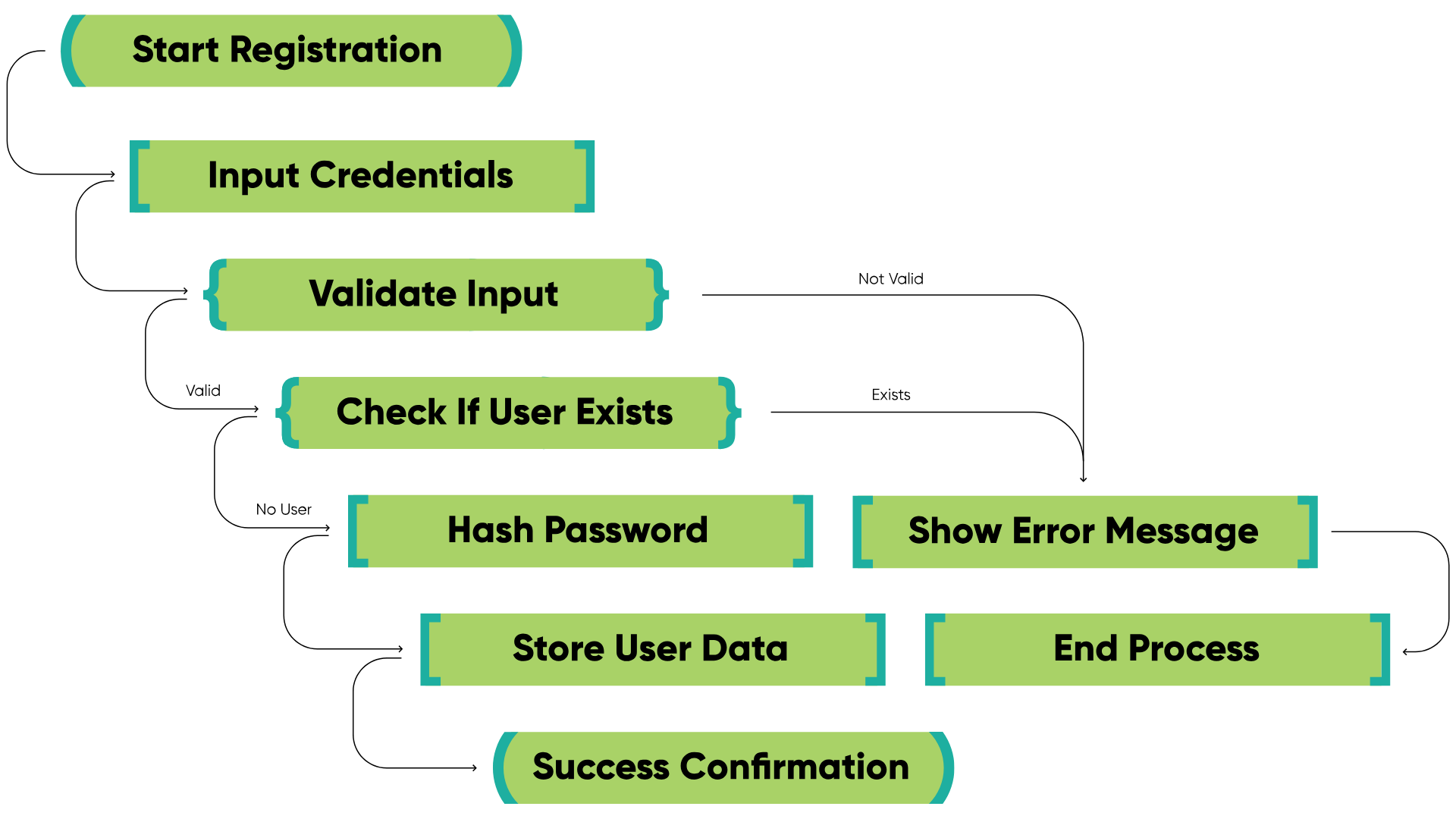
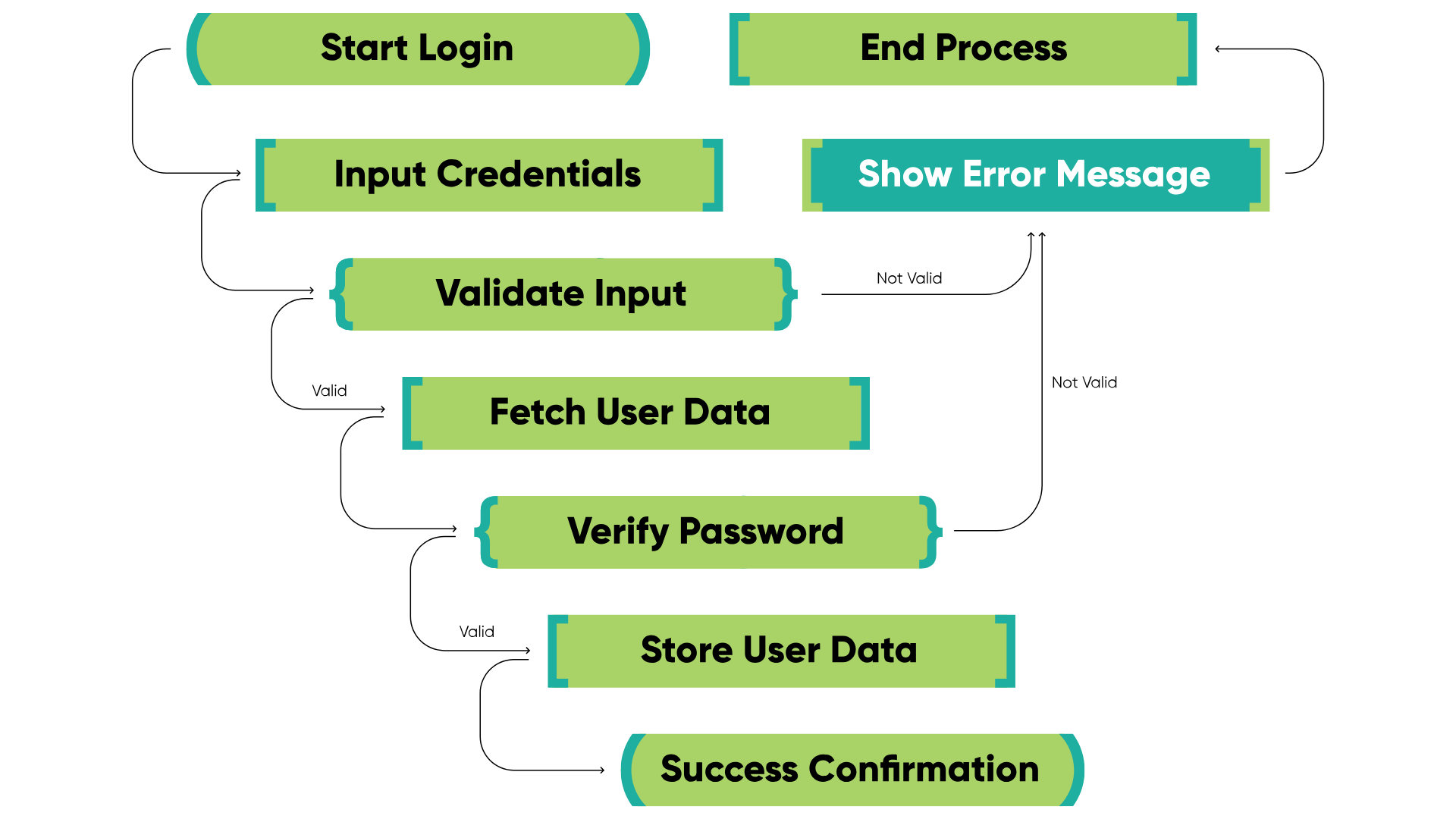
Diagrams illustrate the main objectives and flow of the User Registration/Login feature.
Registration process
Login process
Sequence of actions
- During registration, the system collects user information, including a password. The password is hashed using a secure hashing function (SHA-256 in this case) and a salt from environment variables. The hashed password and other user details are stored in the database.
- When a user tries to log in, the input password is hashed with the stored salt and compared to the saved hash in the database. This ensures the password remains secure and prevents plaintext storage.
- Upon successful login, a JWT (JSON Web Token) is generated for the user and stored in a Cookie. The JWT includes claims such as username, email and role, and serves as a session token. The JWT can then be validated by any service that requires authentication, making user verification easy and secure.
Implementation challenges in Progress OpenEdge authentication
Building a secure authentication system in Progress OpenEdge presents several technical and practical challenges, including cryptographic implementation, library limitations, and error handling.
- Password security. Implementing secure password hashing requires attention to both hash strength and salt usage. It is essential to ensure the hashing and salt generation functions are working correctly.
- JWT management. Generating and managing JWTs in Progress ABL can be complex. Progress OpenEdge does not provide a built-in feature for JWT generation, so a third-party library is used to implement it. Link is provided in the References section.
- Error handling. When authentication fails (incorrect password or expired token), the system must handle errors gracefully and provide helpful messages.
- Limited resources. The relative scarcity of readily available resources, libraries, and best practices for implementing modern authentication and authorisation in Progress ABL can increase development time and complexity. Developers often need to build custom solutions from scratch, which can lead to inconsistencies and potential security vulnerabilities.
Impact & Benefits Of the Authentication Implementation
Implementing this feature enhances both the security and usability of the authentication flow in the Progress OpenEdge application. The main outcomes are:
- Secure authentication. Passwords are securely hashed and stored, reducing the risks of password theft.
- JWT generation. A third-party library is used to generate JWT tokens upon successful user authentication.
- Easy session management. JWT tokens streamline user session management and can be easily validated across different parts of the application.
Core Security Components
1. Password security
Salting & Hashing Flow
User Password → Get Salt From environment variables → SHA-256 Hash → Store (Hash)
PasswordHash Expand source
method public character HashPassword(input pcPassword as character):
  define variable rHash as raw no-undo.
  define variable rSalt as raw no-undo.

  /* Retrieve salt from environment variables */
  rSalt = hex-decode(os-getenv("SALT")).
  /* Generate SHA-256 hash with salt */
  rHash = message-digest("SHA-256", pcPassword, rSalt).

  return hex-encode(rHash).
end method.
2. Password validation
This method securely verifies a user-suplied password against a stored hash using SHA-256 and a salt retrieved from an environment variable.
MatchPassword Expand source
method public logical MatchPassword(input pcUserPassword as character, input pcHashedPassword as character):
method public logical MatchPassword(input pcUserPassword as character, input pcHashedPassword as character):
  if HashPassword(pcUserPassword) = pcHashedPassword then
    return true.
  return false.
end method.
3. JWT generation
Token Creation
This method (login) authenticates a user, generates a JSON Web Token (JWT) with user details and a 2-hour expiration, and returns the token which is later set within cookie. It uses a secret key from an environment variable for signing.
login method Expand source
using jwtoe.Jwt.
using jwtoe.JwtBuilder.

method public character login(input pcUsername as character, input pcPassword as character):
  /* ... Password validation ... */

  cJwtToken = Jwt:builder()
              :setClaim("username", ttAccount.username)
              :setClaim("role", ttAccount.role)
              :setExpiresInSeconds(7200)                 // 2h expiry
              :signWithHS256Key(os-getenv("JWT_SECRET")) // Key from .env
              :compact().

  return cJwtToken.
end method.
Using values from JWT payload
This ABL code snippet demonstrates how to parse and validate a JSON Web Token (JWT) using a third-party library. It retrieves claims (data) from the validated token and displays them. It also includes error handling for invalid tokens.
JWT payload Expand source
using Progress.Lang.*.
using jwtoe.Jwt.
using jwtoe.JwtError.
using Progress.Json.ObjectModel.JsonObject.

method public void ValidateJWT( input pcJwtToken as character ):
def var oClaims as JsonObject no-undo.

    oClaims = Jwt:parseBuilder()
                 :setSigningKeyHS256(os-getenv("JWT_SECRET")) // Key from .env
                 :parseClaimsJws(pcJwtToken). 			     // Token we created in login() method

    // here you are sure that token was valid
    message oClaims:GetCharacter("username").
    message oClaims:GetCharacter("role").

end method.
4. Environment variable security
It is crucial to recognise that the .env file contains highly sensitive data, including API keys, database credentials, and cryptographic secrets.
Under no circumstances should this file be uploaded to any online repository or shared publicly.
Sample .env
Environment variables Expand source
# .env
# Example how content of .env looks in this case
SALT=DEADBEEF12345678
JWT_SECRET=my_super_secret_key_here
Retrieving Environment Variables in ABL
OS-GETENV() Expand source
define variable cSalt   as character no-undo.
define variable cSecret as character no-undo.

cSalt = hex-decode(os-getenv("SALT")).
cSecret = os-getenv("JWT_SECRET").
Key Code Snippets
1. Format Response
This ABL method (FormatResponse) streamlines HTTP response creation: it builds a JSON response with a given status code and body, optionally adds a JWT cookie, and writes the response, reducing boilerplate code.
Important to mention:
- HttpOnly: This prevents client-side JavaScript from accessing the cookie. This mitigates the risk of cross-site scripting attacks, where malicious scripts could steal the cookie and compromise the user's session.
- SecureOnly: This ensures the cookie is only sent over HTTPS connections. This prevents attackers from intercepting the cookie and the JWT it contains.
FormatResponse() Expand source
method protected void FormatResponse(input poStatusEnum as StatusCodeEnum, input pcBody as character):
  method protected void FormatResponse(input poStatusEnum as StatusCodeEnum, input pcBody as character):
    define variable oWriter   as WebResponseWriter no-undo.
    define variable oResponse as WebResponse       no-undo.
    define variable oCookie   as Cookie            no-undo.
    define variable dtExpires as datetime-tz       no-undo.

    dtExpires = now + 3600.

    assign
    	oResponse             = new WebResponse()
    	oResponse:StatusCode  = integer(poStatusEnum)
    	oResponse:Entity      = new String(pcBody)
    	oResponse:ContentType = "application/json"
    	.

    if this-object:cJwtToken <> "" then
    do:
oCookie = new Cookie(
        	"token",               // CookieName
        	"",                    // Domain (empty string if not needed)
        	"/",                   // Path
        	this-object:cJwtToken, // CookieValue
        	3600,                  // MaxAge in seconds
        	dtExpires,             // ExpiresAt: one hour from now
        	true,                  // SecureOnly: true for HTTPS
        	true,                  // HttpOnly: true for security
        	1.0                    // Version: typically 1.0
      	).

oResponse:SetCookie(oCookie).
    	this-object:cJwtToken = "".
    end.

    oWriter = new WebResponseWriter(oResponse).
    oWriter:Open().
    oWriter:Close().
  end method.
2. Registration handler
This ABL method handles user registration: it parses JSON, creates an account, and returns an HTTP response (201 for success, 400 or 500 for errors).
HandleRegister Expand source
method private integer HandleRegister(poRequest as IWebRequest):
    define variable hAccount      as handle     no-undo.
    define variable oJsonBody     as JsonObject no-undo.
    define variable oAccountArray as JsonArray  no-undo.

    empty temp-table ttAccount.

    oJsonBody     = cast(poRequest:Entity, JsonObject).
    hAccount      = temp-table ttAccount:handle.
    oAccountArray = cast(oJsonBody:GetJsonArray("ttAccount"), JsonArray).
    hAccount:read-json("JsonArray", oAccountArray, "append").

    oAccountService:accountForm(table ttAccount).
// Successful response
    this-object:FormatResponse(StatusCodeEnum:Created,"Account Created").
    // Responses on errors
    catch e as Progress.Lang.Error:
      if e:GetClass() = get-class(AppError) then
        this-object:FormatResponse(StatusCodeEnum:BadRequest,"Registration Failed: " + e:GetMessage(1)).
      else
        this-object:FormatResponse(StatusCodeEnum:InternalServerError,"Server Error").
    end catch.
end method.
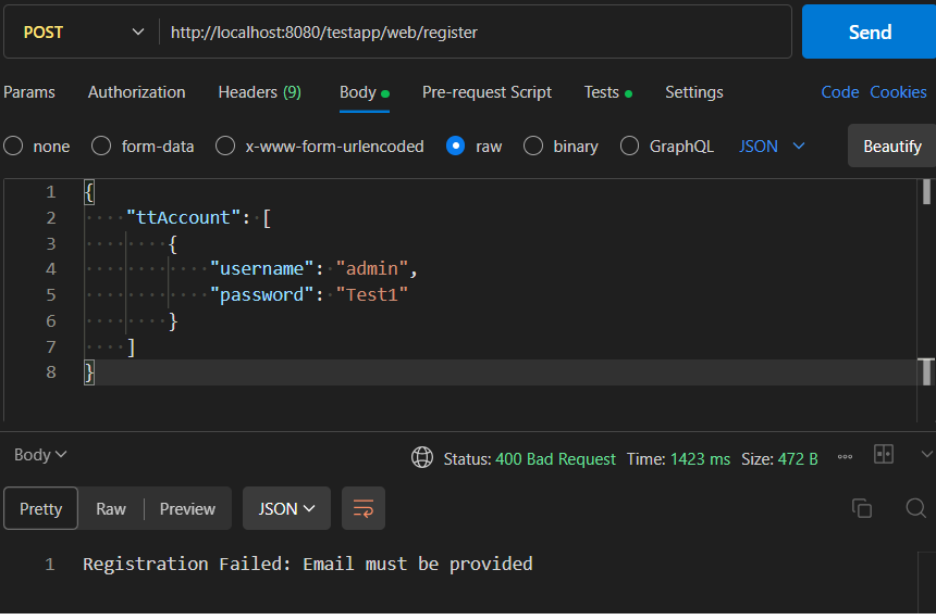
Imitating registration front-end with Postman:
- The client sends a POST request to the /register endpoint/
- The request body contains a JSON array named ttAcount with a single JsonObject representing user data.
It is important to note that plain text passwords are being sent in this request. Therefore, HTTPS must be used to encrypt data and prevent credential exposure during transit.
No email provided error handling ex.:
3. Login handler
This ABL method handles user login: it parses JSON credentials, authenticates, generates a JWT, and returns an HTTP response (200 with token, 401 or 500 on errors).
HandleLogin Expand source
method private integer HandleLogin(poRequest as IWebRequest):
    define variable cUsername     as character         no-undo.
    define variable cPassword     as character         no-undo.
    define variable oJsonBody     as JsonObject        no-undo.
    define variable oAccountArray as JsonArray         no-undo.

    empty temp-table ttAccount.

    oJsonBody     = cast(poRequest:Entity, JsonObject).
    oAccountArray = cast(oJsonBody:GetJsonArray("ttAccount"), JsonArray).
    oJsonBody     = cast(oAccountArray:GetJsonObject(1), JsonObject).
    cUsername     = oJsonBody:GetCharacter("username").
    cPassword     = oJsonBody:GetCharacter("password").

    this-object:cJwtToken = oAccountService:login(cUsername, cPassword).
// Successful response
    this-object:FormatResponse(StatusCodeEnum:OK, "Login Successful").
// Responses on errors
    catch e as Progress.Lang.Error:
      this-object:cJwtToken = "".
 	  if e:GetClass() = get-class(AppError) then
        this-object:FormatResponse(StatusCodeEnum:Unauthorized,"Login Failed: " + e:GetMessage(1)).
      else
        this-object:FormatResponse(StatusCodeEnum:InternalServerError,"Server Error").
    end catch.
end method.
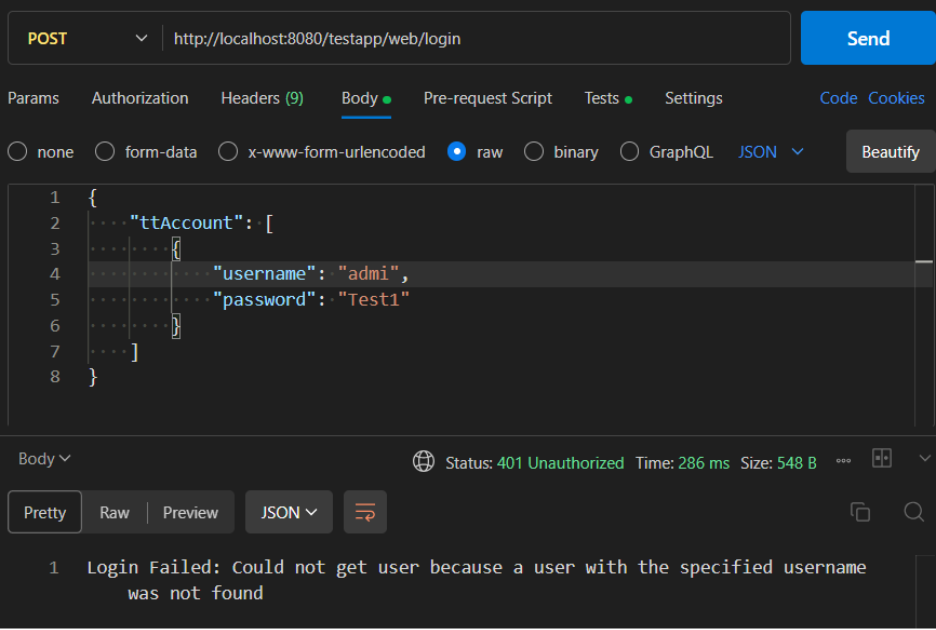
Imitating login Front-end with Postman:
- The client sends a POST request to the /login endpoint.
- The request body contains a JSON array named ttAccount with a single JsonObject representing the user's login credentials (username and password).
It is important to note that plain text passwords are being sent in this request. Therefore, HTTPS must be used to encrypt the data and prevent credential exposure during transit.
User not found error handling ex.:
4. Create Account
This method creates new Account records from a ttAccount temp-table, assigning a unique ID and transferring data.
createAccount Expand source
   method public void createAccount(input table ttAccount):
    define buffer bAccount for Account.

    find first ttAccount.
    if this-object:checkAccountAlreadyExists(ttAccount.userName) then
      undo, throw new AppError('Username already exists', 1).

    create bAccount.
    assign
      bAccount.id       = next-value(AccountId)
      bAccount.username = ttAccount.username
      bAccount.email    = ttAccount.email
      bAccount.password = ttAccount.password
      bAccount.role     = ttAccount.role
      .
    release bAccount.
  end method.
JWT authorisation and access control
This utility class handles JWT-based authentication.
It reads the token from the request cookie, verifies its signature and expiration using the JwtParser class, and returns the decoded user claims.
JwtGuard Expand source
using jwtoe.JwtParser.
using jwtoe.JwtError.
using Progress.Json.ObjectModel.JsonObject.
using OpenEdge.Net.HTTP.Cookie.
using OpenEdge.Web.IWebRequest.
using Progress.Lang.*.

class JwtGuard:

  /* This method checks if the token is valid and returns the claims */
  method public static JsonObject RequireValidTokenFromCookie(poRequest as IWebRequest):
    define variable oCookie    as Cookie     no-undo.
    define variable cToken     as character  no-undo.
    define variable oClaims    as JsonObject no-undo.
    define variable oParser    as JwtParser  no-undo.

    /* Get cookie */
    oCookie = poRequest:GetCookie("token").
    if not valid-object(oCookie) or oCookie:Value = "" then
      undo, throw new AppError("Missing cookie. You are not logged in", 401).

    cToken = oCookie:Value.
    /* Parse the JWT token */
    oParser = new JwtParser().
    oParser:setSigningKeyHS256(os-getenv("JWT_SECRET")).
    oClaims = oParser:parseClaimsJws(cToken).

    return oClaims.
  end method.
end class.
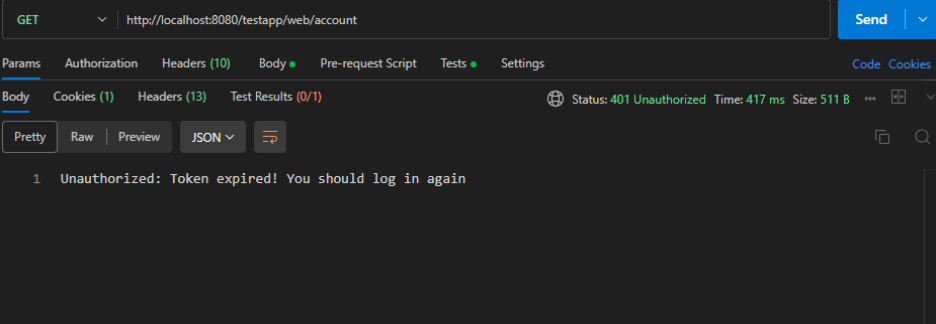
If the token is missing, invalid, or expired, it throws an AppError, which results in an Unauthorized (401) response. This effectively determines whether a user is logged in.
JwtValidation Expand source
define variable oClaims as JsonObject no-undo.

oClaims = JwtGuard:RequireValidTokenFromCookie(poRequest).
Once the claims are returned, role-based access control can easily be applied. For example, to allow access only for admins:
Role validation Expand source
if oClaims:GetCharacter("role") <> "admin" then
do:
  this-object:FormatResponse(StatusCodeEnum:Forbidden, "Access Denied: Only admin can view all accounts").
  return 0.
end.
This makes JwtGuard a clean and centralised way to both authenticate users and enforce role permissions across protected endpoints.
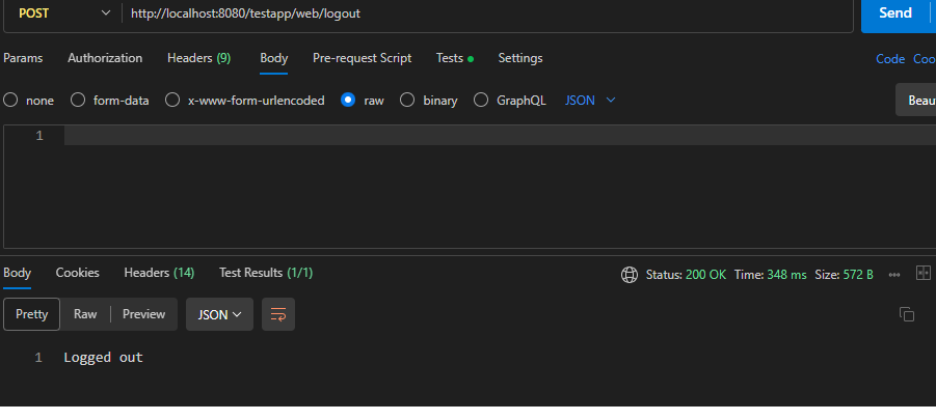
To log out we simply clear out the Cookie by setting its expiration to zero:
Log out Expand source
method protected integer HandleLogout(poRequest as IWebRequest):
  define variable oResponse as IHttpResponse     no-undo.
  define variable oWriter   as WebResponseWriter no-undo.
  define variable oCookie   as Cookie            no-undo.
  define variable dtExpired as datetime-tz       no-undo.

  dtExpired = now - 1. /* Expired timestamp */

  oCookie = new Cookie(
    "token", "", "/", "", 0, dtExpired, false, true, 1.0
  ).

  oResponse = new WebResponse().
  oResponse:SetCookie(oCookie).
  oResponse:StatusCode  = int(StatusCodeEnum:OK).
  oResponse:Entity      = new OpenEdge.Core.String("Logged out").
  oResponse:ContentType = "application/json".

  oWriter = new WebResponseWriter(oResponse).
  oWriter:Open().
  oWriter:Close().

  return 0.
end method.
Authentication Flow in Action
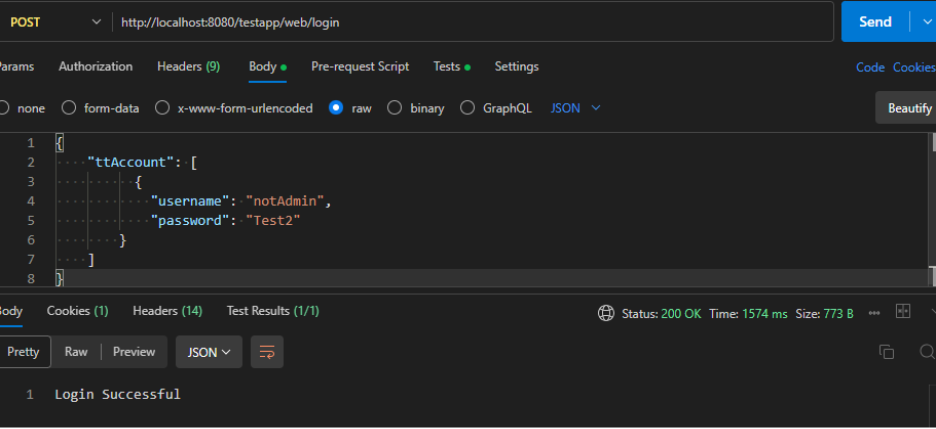
1. Logging in as a regular user
The user logs in with valid credentials but has a non-admin role (e.g., "role": "user"). A JWT token is returned and saved in a cookie.
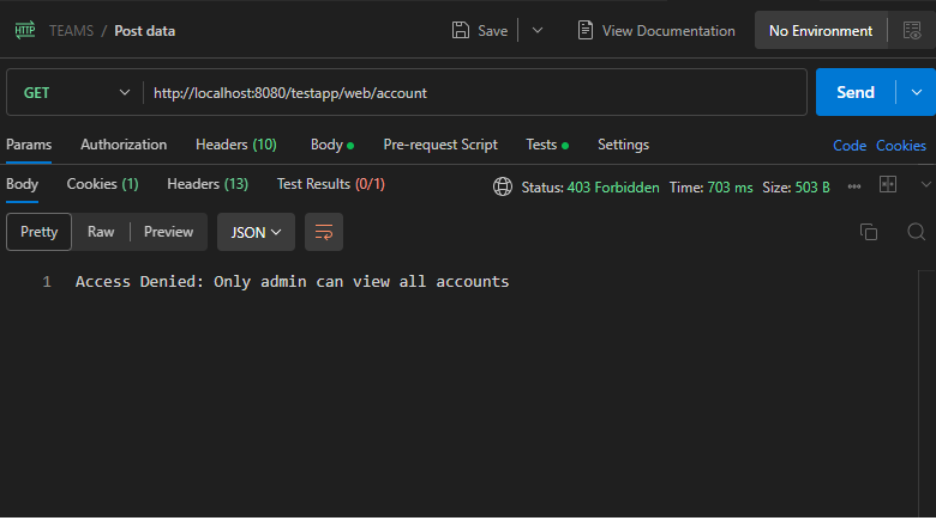
2. Attempting to access /account as a regular user
This protected endpoint is restricted to admin users. When the non-admin user tries to access it, the server checks the JWT claims and responds with:
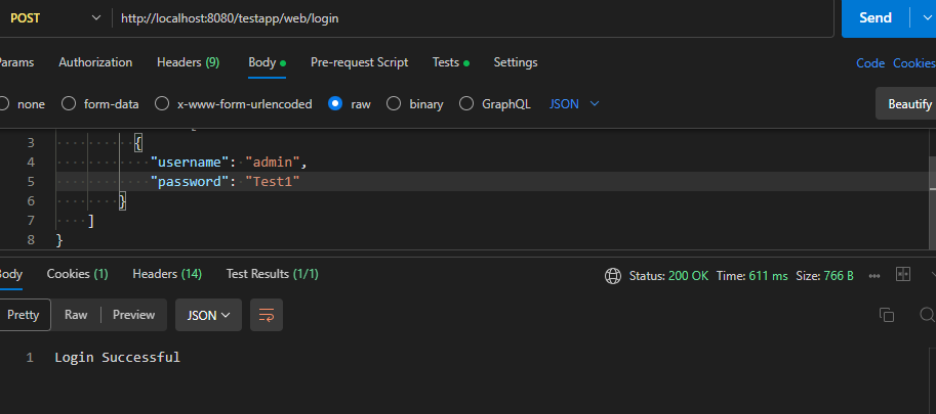
3. Logging in as an admin
The user logs in again, this time with admin credentials. A new JWT token is issued and stored in the cookie.
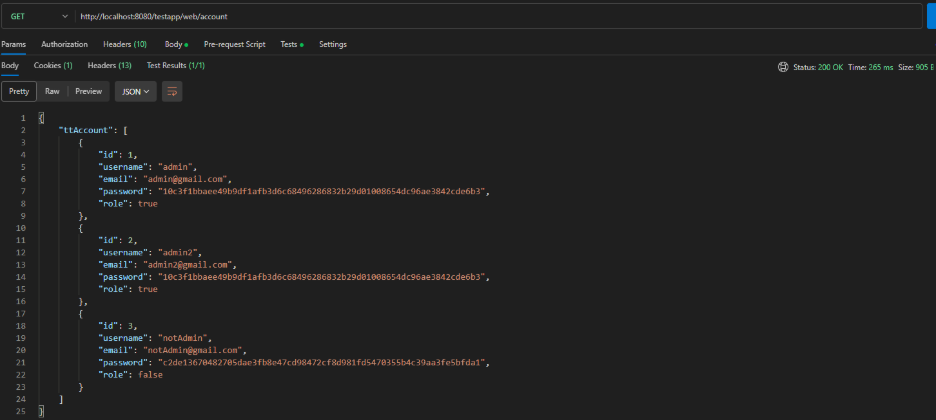
4. Accessing /account as an admin
This time the JWT contains the correct admin role. The request is allowed and the server responds with a list of accounts.
5. Logging out
The user sends a request to the /logout endpoint, which clears the cookie by setting it with an expired timestamp.
6. Attempting to access /account after logout
Since the JWT is now expired or missing, the next request to /account is rejected.
Need Help Implementing Secure Authentication in Progress OpenEdge?
The Baltic Amadeus Progress OpenEdge team is here to support you – whether you are planning a new architecture, modernising legacy logic, or integrating authentication with external systems. Contact us today to get expert guidance tailored to your goals.
Project example: