




Before Progress OpenEdge 12.8: Traditional Ways to Move Data
Before Progress OpenEdge 12.8, developers had several established methods for exporting and importing data. Let’s take a closer look at how they worked.
Option 1: Using Utilities (.d files)
One of the oldest and most reliable methods is to use built-in Progress OpenEdge utilities:
proutil mydb -C dump sports.customer customer.d
proutil mydb -C load sports.customer customer.d
These commands are fast, straightforward, and reliable, which makes them perfect for full-table exports. However, they’re not very flexible: you can’t filter records, pick specific fields, or change the format. You either export everything or nothing.
The Data Administration tool uses these same utilities behind the scenes.
Option 2: Using Temp-Tables (JSON/XML)
Temp-tables are another popular way to export and import data in OpenEdge. They’re flexible, easy to understand, and work well with JSON or XML formats.
Here’s a simple example:
// Export
define temp-table ttCustomer no-undo like Customer.
for each Customer no-lock:
create ttCustomer.
    buffer-copy Customer to ttCustomer.
end.
temp-table ttCustomer:write-json("file", "Customer.json", true).
// or
temp-table ttCustomer:write-xml("file", "Customer.xml", true).

// Import
define temp-table ttCustomer no-undo like Customer.
temp-table ttCustomer:read-json("file", "customer.json").
// or
temp-table ttCustomer:read-xml("file", "customer.xml", "empty", ?, ?, ?).

for each ttCustomer:
create Customer.
buffer-copy ttCustomer to Customer.
end.
Sometimes you need something more dynamic, like exporting all tables in a database without hardcoding each one. You can do that by reading table metadata from the schema tables _File and _Field. The process looks like this:
VAR HANDLE hTable.
FOR EACH _File NO-LOCK WHERE
          _File._Tbl-Type EQ "T":
    CREATE TEMP-TABLE hTable.
    FOR EACH _Field NO-LOCK WHERE
             _Field._File-recid EQ RECID(_File):
        hTable:ADD-NEW-FIELD(_Field._Field-Name, _Field._Data-Type).
    END.
    hTable:TEMP-TABLE-PREPARE("tt" + _File._File-Name).
END.
After that, all that’s left is to query the data from the database, fill the temp-table, and export it in your chosen format, for example, JSON:
CREATE BUFFER hBuffer FOR TABLE _File._File-Name.
CREATE BUFFER hTTBuffer FOR TABLE hTable.

CREATE QUERY hQuery.
hQuery:SET-BUFFERS(hBuffer).
hQuery:QUERY-PREPARE("for each " + hBuffer:NAME).
hQuery:QUERY-OPEN().
hQuery:GET-FIRST().

// Query the DB and copy the buffer to dynamic Temp-Table
DO WHILE NOT hQuery:QUERY-OFF-END:
  hTTBuffer:BUFFER-CREATE().
  hTTBuffer:BUFFER-COPY(hBuffer).
  hQuery:GET-NEXT().
END.

// Export the data
hTable:WRITE-JSON("file", "./export/" + _File._File-Name + ".json", TRUE).
If you want to export every table dynamically, here’s the complete code:
VAR HANDLE hTable.
VAR HANDLE hBuffer.
VAR HANDLE hTTBuffer.
VAR HANDLE hQuery.

FOR EACH _File NO-LOCK WHERE
          _File._Tbl-Type  = "T":
    CREATE TEMP-TABLE hTable.
        FOR EACH _Field NO-LOCK WHERE
             _Field._File-recid EQ RECID(_File):
        hTable:ADD-NEW-FIELD(_Field._Field-Name, _Field._Data-Type).
    END.
    hTable:TEMP-TABLE-PREPARE("tt" + _File._File-Name).

    CREATE BUFFER hBuffer FOR TABLE _File._File-Name.
    CREATE BUFFER hTTBuffer FOR TABLE hTable.

    CREATE QUERY hQuery.
    hQuery:SET-BUFFERS(hBuffer).
    hQuery:QUERY-PREPARE("for each " + hBuffer:NAME).
    hQuery:QUERY-OPEN().
    hQuery:GET-FIRST().

    DO WHILE NOT hQuery:QUERY-OFF-END:
        hTTBuffer:BUFFER-CREATE().
        hTTBuffer:BUFFER-COPY(hBuffer).
        hQuery:GET-NEXT().
    END.

    hQuery:QUERY-CLOSE().

    hTable:WRITE-JSON("file", "./export/" + _File._File-Name + ".json", TRUE).

    DELETE OBJECT hQuery.
    DELETE OBJECT hTTBuffer.
    DELETE OBJECT hTable.
    DELETE OBJECT hBuffer.
END.
This approach is straightforward and developer-friendly. It lets you dynamically export every table in your database as JSON files without writing separate logic for each one.
The downside is that temp-tables store everything in memory. For smaller datasets, that’s fine, but for large ones, you’ll need batching, which adds complexity.
Option 3: Using ABL Export/Import
Another option is the built-in EXPORT and IMPORT statements. This approach is great when you want to control the process entirely in code:
// Export
OUTPUT TO VALUE("customers.d").
FOR EACH Customer NO-LOCK:
    EXPORT DELIMITER "," Customer.CustNum Customer.Name Customer.SalesRep.
END.
OUTPUT CLOSE.

// Import
INPUT FROM VALUE("customers.d").
REPEAT ON ENDKEY UNDO, LEAVE:
    CREATE Customer.
    IMPORT DELIMITER "," Customer.CustNum Customer.Name Customer.SalesRep.
END.
INPUT CLOSE.
The logic here is simple: run a query, then use EXPORT to write or IMPORT to read. It gives you more control over formatting, since you can choose delimiters and specify exactly which fields to include.
To make it dynamic, though, you must loop through all records and fields manually using buffers and the PUT statement:
// Dynamic Export Example
CREATE BUFFER hBuffer FOR TABLE cTable.

CREATE QUERY hQuery.
hQuery:SET-BUFFERS(hBuffer).
hQuery:QUERY-PREPARE("FOR EACH " + cTable + " NO-LOCK").
hQuery:QUERY-OPEN().
hQuery:GET-FIRST().

OUTPUT TO VALUE(cFileName).

DO WHILE NOT hQuery:QUERY-OFF-END:
    IF hQuery:QUERY-OFF-END THEN LEAVE.

    DO iCount = 1 TO hBuffer:NUM-FIELDS:
        hField = hBuffer:BUFFER-FIELD(iCount).
        PUT UNFORMATTED (IF iCount > 1 THEN "," ELSE "")
                        hField:BUFFER-VALUE.
    END.
    PUT SKIP.

    hQuery:GET-NEXT().
END.

OUTPUT CLOSE.
hQuery:QUERY-CLOSE().
This version works, but it comes with trade-offs. Because it uses PUT, you have to manually handle the delimiter, field order, and formatting. It also means you are directly responsible for how the exported data looks, which increases the chance of errors and makes the code harder to maintain.
The New Buffer-Based Export in 12.8
Those were the traditional ways of moving data – solid, but with their own limitations. With Progress OpenEdge 12.8, developers finally get a cleaner and more dynamic way to handle data export and import using buffers.
Previously, exporting data meant looping through each field manually, like this:
DO iCount = 1 TO hBuffer:NUM-FIELDS:
    hField = hBuffer:BUFFER-FIELD(iCount).
    PUT UNFORMATTED (IF iCount > 1 THEN "," ELSE "")
                     hField:STRING-VALUE.
END.
Now, it’s a single line:
hBuffer:BUFFER-EXPORT().
The BUFFER-EXPORT method automatically exports all buffer data and lets you customise parameters such as delimiter, field selection, skipping LOBs and more. It works in both static and dynamic queries and is much faster to write and maintain.
The only limitation appears when you need to export calculated or derived fields that aren’t stored directly in the database. You can handle that in two ways:
- Use a temp-table with calculated fields
- Combine BUFFER-EXPORT with traditional EXPORT
Here’s an example using a temp-table with a calculated field:
/* Example: Calculated fields using a temp-table */
DEFINE TEMP-TABLE ttOrder NO-UNDO LIKE Order
    FIELD DiscountPct AS DECIMAL FORMAT ">>9.99". /* Additional calculated field */

OUTPUT TO VALUE("orders.csv").

FOR EACH Order NO-LOCK:
    /* Create one record in ttOrder per Order */
    CREATE ttOrder.
    BUFFER-COPY Order TO ttOrder.

    RUN calculateFields.

    /* Export row */
    BUFFER ttOrder:BUFFER-EXPORT().
    DELETE ttOrder.
END.

OUTPUT CLOSE.

PROCEDURE calculateFields:
    DEFINE VARIABLE dTotalOrderPrice AS DECIMAL NO-UNDO.
    DEFINE VARIABLE dOrderPrice      AS DECIMAL NO-UNDO.
    DEFINE VARIABLE dTotalDiscount   AS DECIMAL NO-UNDO.

    /* Business logic calculations: Sum up line totals and discounts */
    FOR EACH OrderLine NO-LOCK WHERE OrderLine.OrderNum EQ Order.OrderNum:
        ASSIGN
            dOrderPrice      = OrderLine.Price * OrderLine.Qty
            dTotalOrderPrice += dOrderPrice
            dTotalDiscount   += dOrderPrice * (OrderLine.Discount / 100).
    END.

    /* Calculate the discount percentage */
    ttOrder.DiscountPct = IF dTotalOrderPrice NE 0
                           THEN 100 * (dTotalDiscount) / dTotalOrderPrice
                          ELSE 0.
END PROCEDURE.
We create a temp-table mirroring the Order table and add an extra field called DiscountPct. For each order, we copy the record into the temp-table, calculate the value, and then export it using BUFFER-EXPORT.
This way, the exported file contains both the original fields and the calculated ones, with minimal code and no need for manual field loops. Now, let’s break down how OpenEdge 12.8 performs compared to older methods.
Performance: How Fast Is It Really?
One of the most interesting parts of this feature is how it performs in practice.
To see how the new approach compares, we tested data export in Progress OpenEdge 12.8 using 4 different methods:
- Using Buffer-Export.
- Exporting JSON with temp-tables.
- Exporting XML with temp-tables.
- Using
put unformatted.
Since Export and Import statements don’t support dynamic exporting, they were replaced with the PUT UNFORMATTED version for comparison.
The expectation was that BUFFER-EXPORT would perform similarly to PUT UNFORMATTED, while JSON and XML exports would be slower due to extra data conversion overhead.
For testing, we used a modified sports2020 database that contained much more data than the standard version. The test database was around 350 MB, compared to the usual 13–15 MB.
Special data types such as BLOBs, CLOBs, MEMPTR, and LONGCHAR were excluded to keep the test consistent. All procedures were nearly identical, with the only difference being the output method.
And the results were surprising:
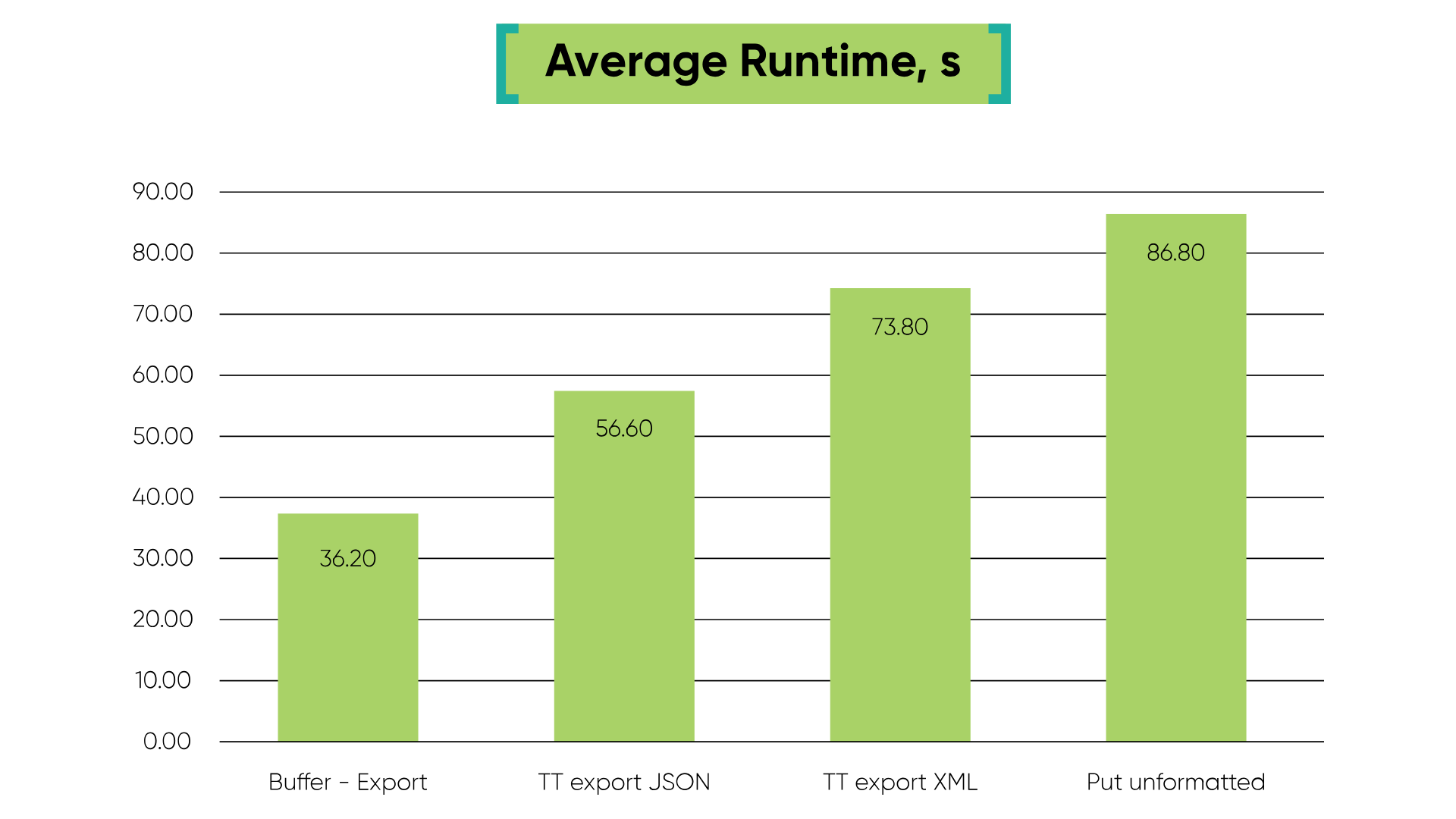
To export the full DB to CSV/JSON/XML it took:
- Buffer-Export: 36.2 seconds to CSV.
- Export JSON using temp-tables: 56.6 seconds to JSON.
- Export XML using temp-tables: 73.8 seconds to XML.
Put unformatted:86.8 seconds to CSV.
The results show that the BUFFER-EXPORT method turned out to be significantly faster, taking less than half the time of PUT UNFORMATTED.
As expected, exporting to JSON or XML took longer because the data had to be first loaded into temp-tables and then written to file. XML also lagged behind JSON, which makes sense since XML is a much more verbose format.
In short, BUFFER-EXPORT delivered the best balance of speed, simplicity, and flexibility.
Summary of Methods: Old vs New
Conclusion: Progress OpenEdge 12.8 is Ready to Take Over
Version 12.8 of Progress OpenEdge marks a real shift in how developers handle data movement. The new buffer-based export and import methods make working with data feel cleaner and more modern: less manual looping, fewer workarounds, and much faster results.
Beyond that, BUFFER-EXPORT brings a strong balance between simplicity and power. It:
- Delivers high performance with minimal code.
- Keeps the straightforward logic of traditional EXPORT and IMPORT.
- Works seamlessly in both static and dynamic contexts.
- Allows you to easily include or exclude specific fields.
This makes buffer handles the best choice for Progress OpenEdge projects that move data through code and need flexibility and scalability.
While they don't replace temp-tables for structured JSON or XML exports, they do effectively take over the role of traditional EXPORT and IMPORT statements.
Hopefully, this gave you a clearer picture of how the new approach compares in practice. If you’re working with Progress OpenEdge and need expert support, our team is here to help – book your consultation.