




Progress OpenEdge Collections
The collections introduced in OE 12.5 (and refined in 12.7) provide a new, easier way to store your data - these collections take advantage of generics, thus you can store and retrieve your objects directly, without the need to cast them. Additionally, in some cases, they provide better performance than anything else currently existing in OpenEdge. These collections are implemented natively, thereby avoiding much of the "interpreter tax" associated with traditional ABL classes.
- List<T>: A simple, ordered collection, which can contain duplicate items. Use this when the sequence of items matters.
- SortedSet<T>: A collection of unique elements that stay sorted. Great for maintaining a unique list of IDs.
- HashMap<K,V>: A collection of Key-Value pairs (a Map), backed by a hash function and primarily designed for lightning-fast lookups. Unordered and unsorted.
What is a HashMap?
A HashMap is a critical data structure in computer science, known for its ability to store and manage key-value pairs, with a focus on fast data retrieval.
Progress OpenEdge developers are accustomed to temp-tables and FIND statements. On an indexed table, it's usually a very fast operation. However, it still involves doing a B-Tree search (O(log n) time complexity). On a large table with many operations, this can become noticeable. A HashMap could be even faster – its theoretical time complexity is O(1), meaning that it doesn't search for data – it 'knows' where it is.
Every entry in a HashMap has two parts: key and value. This can define a data relationship, such as Employee-Manager, where each key (Employee) is a unique object used to find the value (Manager), which itself can be repeated across multiple HashMap entries. A key can also be just a unique property (Employee ID) of a value object (Employee).
If HashMap is unordered and unsorted, how does it know where to put and retrieve your data from? It uses a Hash function.
When you give the Map a key, it runs that key through a mathematical formula (the hashCode() method in ABL). This formula spits out a number, which HashMap then uses as an index to a specific bucket in memory.
This is why it's so fast – whether you have 10 items or 1,000,000, the hash function always takes the same amount of time to calculate the bucket address. Every different key in a HashMap will ideally produce a different hash code, leading directly to your data.
HashMaps in Progress OpenEdge
Creation and type safety
Starting in OpenEdge 12.5, we have Generics, which is one of the best reasons to start using new collections – they provide compile-time type checking. You no longer have to cast every object you pull out of a collection or temp-table. Generic types can also be interfaces, but the stored objects must always be of the same class type. Keep in mind that both keys and values in a Progress HashMap must be objects – I'll unpack the effect of this a bit later.

Setting up a key object
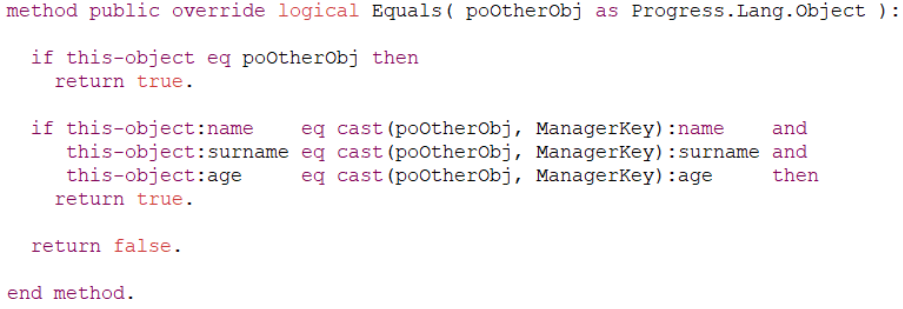
If you decide to create a custom class to use as a key (in my example, a ManagerKey class containing name, surname and age properties), the class has to implement the IHashable interface and override its two methods.
HashMap uses Equals() method to confirm if two keys are the same. This is an important part of hash maps, because while a hash function can sometimes return the same value for different keys, this method must always ensure uniqueness. By default, the AVM considers two objects equal only if they share the same memory address (i.e., the same instance). In this method, you must write custom logic to compare key properties inside two objects.
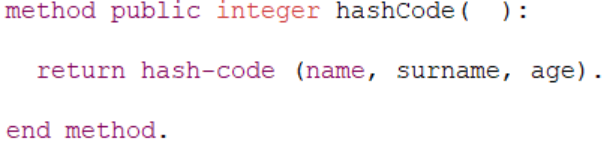
Another fundamental method of HashMaps is hashCode(). This method returns an integer that indicates which memory bucket the HashMap should look in. Use the built-in hash-code() function on your object's unique properties, often the ones used in the Equals() method, to ensure that hash codes will be unique. When multiple objects produce the same hash codes, it's called a collision – not necessarily a dealbreaker for a HashMap, but then it must search through the bucket linearly, which is slow.
HashMap operations
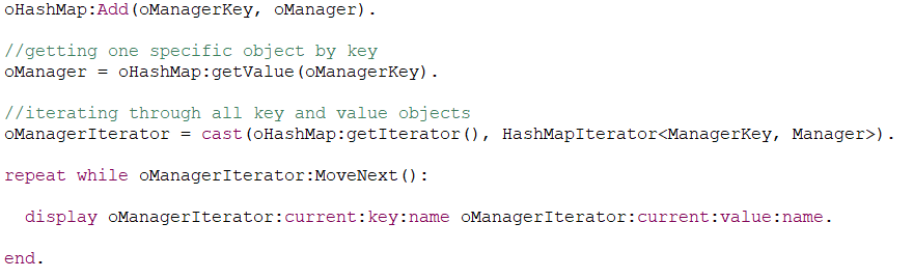
Besides fast lookups and compile-time type checking, another reason to use HashMaps (or other collections) is that their operations are very simple, and code usually looks cleaner, more in line with other OOP languages, as compared to doing the same with two objects in a temp-table.
Using scalar data types as keys
Not every HashMap is a connection between objects. In fact, more often than not, we use integers or characters as keys for HashMaps. While we can't do that directly in Progress OpenEdge, there are some easy workarounds for this problem.
OpenEdge.Core wrappers
Progress provides a set of standard wrapper classes out of the box. These are the most common ways to "box" your primitive data:
- OpenEdge.Core.String (for CHARACTER)
- OpenEdge.Core.Integer (for INTEGER)
- OpenEdge.Core.Decimal (for DECIMAL)
- OpenEdge.Core.DateHolder (for DATE or DATETIME)
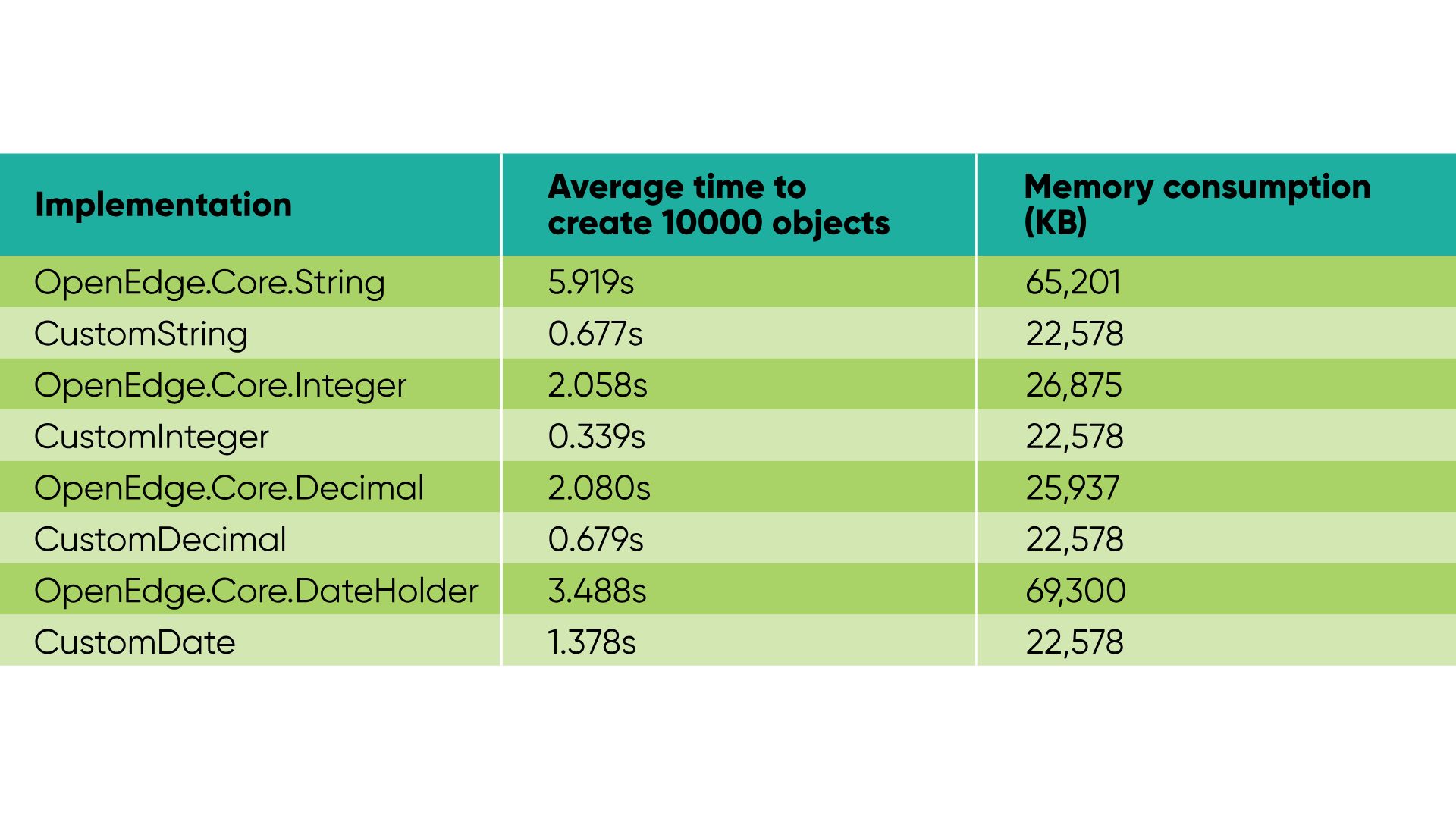
If performance is very important to you, it must be noted that these classes might not be as lightweight as you'd like. They carry extra overhead and logic that might not be needed, and if you store 10000 values in a HashMap, you will be creating 10000 wrapper keys, so that overhead will start to matter.
Lightweight custom wrappers
When processing a large number of objects, I'd recommend writing your own minimal wrapper for scalar type keys, without any extra baggage of OpenEdge.Core library classes. This also allows us to define a custom hashCode implementation, which might be needed to avoid hash collisions. The performance differences in my test cases were very noticeable, with custom wrappers being 3 to 10 times faster during object creation and consuming less memory.
Hash collisions
While testing different HashMap implementations, I noticed significant performance dips in several of them. With a bit of profiler analysis, I saw that there was a bunch of Equals() method calls while storing new objects – this told me that those particular HashMaps had a lot of collisions.
A hash collision is a problem when two different keys produce the same hash code, and it's often the biggest bottleneck for HashMap performance. In a case like this, two (or more) different values are put in the same memory bucket, which means that during the lookup of those values, the HashMap must iterate through several objects in a bucket and compare them using the Equals() method.
The hash-code() function in ABL returns a 32-bit signed integer, which means that there are 232 (about 4.3 billion) possible hash values. This might sound like a lot, but the 'Birthday Paradox' tells us that collisions will happen much sooner than we expect. And with a weak implementation of the hashCode() method, HashMap slowly degrades from a very fast O(1) data structure into a series of slow, sequential lists with O(n) lookup time.
My main takeaway after testing this was that for simple string keys, especially those that follow similar patterns (e.g. a number in a string form), hash collisions are quite likely. In one particularly bad case, the limit of data entries was about 10000 objects before collisions started to happen for most of the additional keys. This might indicate that the hash-code() function in OpenEdge can be rather weak. I strongly recommend using "salt" or combination hashing during hash code calculations to ensure its uniqueness. A hash-code() function takes in up to 10 parameters, so even if you're using a wrapper class with only one data member, combining it with some additional values can greatly increase the performance of Hash Maps.
HashMap vs Temp-table performance
By now, we know that an indexed temp-table has O(log n) lookup performance, while a correctly set up HashMap can do it in O(1). However, I soon learned that this HashMap speed is more theoretical than what we get in practice.
- Initial population of HashMaps in a lot of cases will be slower than temp-tables due to having to create an object for every key, especially if keys are scalar values, and object creation will always be more costly than any lookup time gains.
- A 32-bit hash function will likely result in quite a few collisions in very large maps. This puts a HashMap into an awkward position where lookup speed isn't noticeable against a temp-table if the data set is too small. Still, it also gets slower if the map is too big and contains hash collisions.
- If the size of a HashMap is initially unknown, it will inevitably have to rehash the stored data multiple times. It's a process when the number of memory buckets is increased to preserve O(1) lookup speed, and that costs time.
- HashMaps put much more strain on the garbage collector than temp-tables, as the process often pauses to check whether all objects in a HashMap are still in use. Several simple profiling tests with 1 million objects showed that garbage collection for temp-table storage took, on average, 8.6s, while for a HashMap it took 14.3s.
In my opinion, a HashMap should mainly be used when defining a relationship between two real objects, while an integer/character to object relationship is better stored in a temp-table. Still, I wanted to test if an isolated getValue() method in a HashMap performs better than a find statement on an indexed table, and most of the test results were underwhelming – temp-tables outperformed HashMaps. However, performance will differ from case to case depending on the data we are storing and how temp-tables and HashMaps are configured, so take it with a grain of salt.
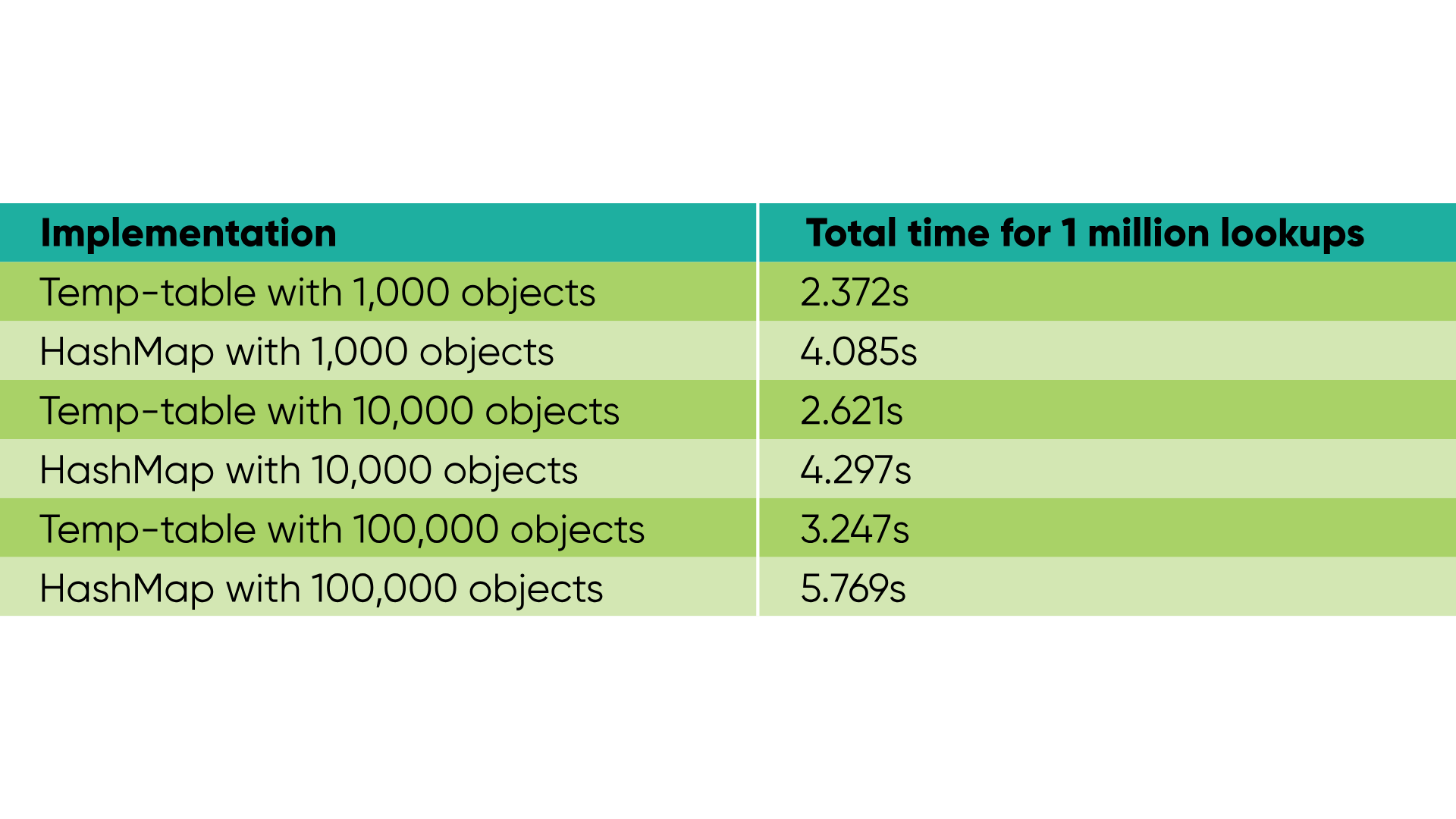
Conclusion: Should you switch from temp-tables to HashMaps?
While a HashMap and a temp-table are fundamentally different structures, when the purpose is to store objects or map their relations, a HashMap should absolutely be considered as an alternative when implementing new code. However, my take on this is that if performance is your only concern, it is rarely worth switching from temp-tables.
It's a specialised tool for the 'Key-Value' problem, which in some specific cases might yield better performance than temp-tables, but even putting performance aside, a lot of ABL code could be made more readable and maintainable by implementing HashMaps.
Use HashMaps if you need:
- Clean, modern code. To make your ABL look and feel like Java or C#, improving readability for new developers.
- Generic Type safety. To catch errors at compile time rather than runtime.
- Object-to-Object mapping. When your data is already living as instances of classes.
Most other cases? Temp-table is still the king.
Discover more about our Progress OpenEdge services from Baltic Amadeus.