




The problem
Performance tuning and bottleneck analysis in Progress applications is quite different from what we are used to in many other environments. Sometimes it feels like index selection in OpenEdge does not always follow the rules you expect. Of course, there is logic behind it, but in real projects the answer is not always obvious. Very often, solving performance issues requires a mix of developer instinct, experience, and a good understanding of how the database is designed.
One major difference is that the OpenEdge database does not provide the same kind of table statistics that many other databases do. Recently, I worked on a case where this kind of information would have been very useful.
In most situations, the Profiler or an xRef listing is enough to find and fix performance problems. Almost.
In this case, I had a very simple table used to store imported records. The important fields were:

BatchId, ImportOrder and State. Records were imported in batches, and every record from the same batch has the same BatchId. Each record from the batch received its own import order number as ImportOrder. State represents the status of each record: IMPORTED, OK, ERROR… ect. Table, among others, had a combined index on idx_BatchId_ImportOrder and a single field index idx_State.
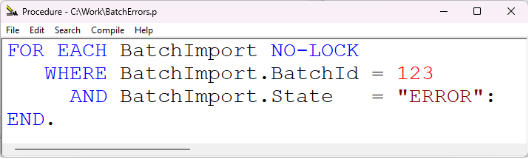
I wanted to report records from a currently imported batch that had failed and ended up with the ERROR status. The query was simple:
I expected the Progress to use the idx_BatchId_ImportOrder index, or maybe combine indexes that covered the fields used in the query.
That was not what happened. Progress used idx_State,and the query runs extremely slowly. Changing the order of conditions in the query did not help.
Performance Test
To confirm the performance impact, I prepared a test in a sample environment. The table had 1,000,000 records. I ran the query 100 times, each time asking for a different BatchId. Each query returned to around 900 records.
I compared the original query with a version where the index was forced explicitly:

The average execution time for a single query was:
- With default index – around 950 milliseconds.
- With USE-INDEX forced index – around 2 milliseconds.
That is a huge difference. So yes, it is definitely worth looking for cases like this.
Why Progress Selected this Index
The first idea would be that Progress should use two indexes for this query. However, that is possible only when all components of each index are used in equality matches.
In this case, the ImportOrder field was not part of the query, so Progress could not use the combined index in the way I expected.
A similar reason prevented idx_BatchId_ImportOrder from being selected as the main index.
General rules for index selection are:
- Use the index specified in a USE-INDEX option.
- If there is a CONTAINS clause, use the word index.
- If an index is unique and all of its components are used in active equality matches, use the unique index.
- Use the index with the most active equality matches.
- Use the index with the most active range matches.
- Use the index with the most sort matches.
- If there is a tie, use the index that comes first alphabetically. If the PRIMARY index is part of the tie, use the PRIMARY index.
- Use the primary index.
The important rule here is number 4.
The idx_BatchId_ImportOrder index was not selected because only the first field from the combined index was used in the query. The second field, ImportOrder, was not used.
The idx_State index, on the other hand, had one field, and that field was used in the query. From Progress’ point of view, this looked like a better match.
Technically, Progress selected an index. But from a data selectivity point of view, it was a bad choice. In my data, there were thousands of records with State = "ERROR" across many import sessions, but only a few hundred records with the same BatchId.
So, the query scanned far more data than necessary.
Looking for a Better Way to Detect It
I use Matt Verrinder’s free xRefAnalys tool, which has helped me many times. I have also made a few small improvements to it.
However, in this case it did not raise a clear warning.
The tool marks queries in red when WHOLE-INDEX is used. But here, Progress did select an index. It just did not select the best one for the data. So there was no obvious red flag.
I had thousands of records with ERROR status from many import sessions, and only a few hundred records for a single BatchId. Still, I had to look at the query several times before I noticed that the selected index was the real reason for the poor performance.
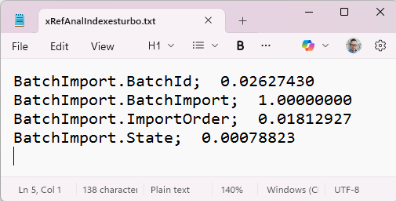
This value represents the ratio between distinct values in a field and the total number of records in the table. If the value is close to 1, almost every record has a different value in that field. This means the field has very high selectivity.
The lower the value, the more records share the same field value. As a result, the index becomes less selective, and the query may need to scan more records.
In general, indexes on fields with higher selectivity are usually more effective.
Once I had the selectivity information, the next step was obvious. Why not combine it with the xRef data in Matt Verrinder’s tool?
I extended xRefAnalyzer so that it still warns about WHOLE-INDEX usage, but also points out queries where a potentially better index may exist. For each candidate index, the tool shows a selectivity score that can help decide whether the index selected by Progress is really the best option.

For combined indexes, I summarise field selectivity only when the indexed fields appear consecutively in the same order as they appear in the index and are also used in the query.
Possible Improvements
There are still several things that could be improved.
At the moment, my data analyser calculates results for a different table on each run. In the future, it could be prepared to work in batch mode and run during less busy hours. A timestamp could also be added to mark when calculated results become outdated.
Another useful improvement would be a time limit that stops the analysis after a defined period, for example, after two hours. This would make the tool safer to run on larger databases.
There is always room to improve.
Results and Takeaways
In conclusion, always check which index Progress selected for your query. Think about the data you are working with. A field can be indexed and still be a poor choice if it contains only a few distinct values.
Also,when designing database structures, remember that multi-field indexes are powerful, but they are not always preferred over single-field indexes. Progress index selection depends heavily on how many leading index components are used by the query.
The golden rule is simple: an index is useful only when your query can use it effectively.
Write good code, test your product, and never assume that the selected index is the best one.
If you are dealing with slow Progress OpenEdge queries, unexpected index selection, or performance issues that are hard to explain, we can help. Get in touch with our team.